


















Snapchat Spotlight Downloader
Save any public Spotlight video as an MP4, with its cover image as a JPG. Free, no ads, no login.
- Copy the linkin Snapchat
- Paste it hereit opens by itself
- Tap Saveit's on your phone
MP4 with soundCover JPG540 x 960
What this Snapchat Spotlight downloader does
To download a Snapchat Spotlight video, copy its share link, paste it into TapDownload and tap Download. You get an MP4 with sound: the 540 x 960 file, which carries Snapchat's logo and the creator's @username, or the 480 x 852 copy Snapchat keeps without them. The cover image saves as JPG.
TapDownload is a free website that saves public Snapchat Spotlight videos, stories and highlights from their link. It is not affiliated with Snap Inc.
Spotlight is Snapchat's public feed of short videos, and every Spotlight post has its own page on snapchat.com that anyone can open without an account. This Snapchat Spotlight video downloader reads that public page and gives you the video file Snapchat itself serves. New to Spotlight? What Snapchat Spotlight is explains how the feed works.
Download a Snapchat Spotlight video in three steps
- Copy the link. In Snapchat, open the Spotlight video, tap the Share arrow, then Copy link.
- Paste it into the box above. The download starts looking as soon as you paste.
- Tap Save. The MP4 goes to your Downloads. Use the sliders button first if you want the clean copy, the sound only, or a GIF.
How to copy a Spotlight link
- On your phone: open the Spotlight video in Snapchat, tap the Share arrow, then Copy link.
- On a computer: open the video on snapchat.com and copy the address from the browser bar.
- For every Spotlight from one creator: type their @username instead. TapDownload lists their public Spotlight videos with their story and highlights.
These link shapes all work:
| Link | Looks like |
|---|---|
| Spotlight video | snapchat.com/ |
| Spotlight on a profile | snapchat.com/ |
| A creator's profile | snapchat.com/ or @username |
What you get
- The video as an MP4, with sound, in the version you pick. Spotlight videos come in two sizes: 540 x 960 (what snapchat.com plays) and a smaller 480 x 852. Each shows its real file size.
- Or just the sound, or a GIF: audio only as AAC (copied, not re-encoded), or a GIF of the first 10 seconds.
- The cover image as a JPG, if you want the still too.
- The length, size and creator before you save, and a player to check it's the right one.
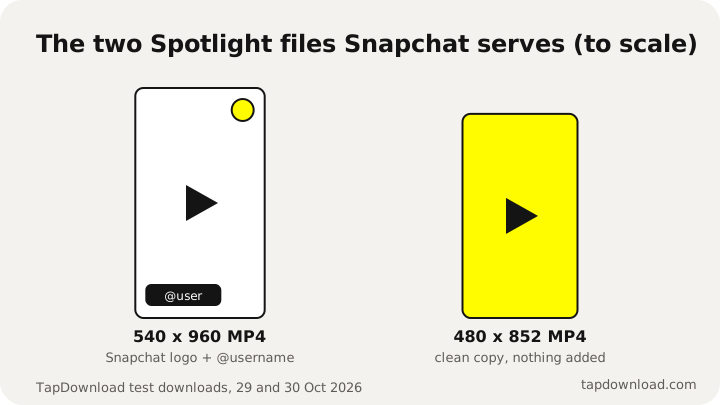
Snapchat keeps two copies of each Spotlight video on the web: 540 x 960 with its logo and the creator's @username, and 480 x 852 without them. TapDownload lists both under Quality, labelled, and changes neither. If you share the video, credit the creator.
| Spotlight file (TapDownload test, 29 and 30 October 2026) | Size | On the video |
|---|---|---|
| Main MP4 | 540 x 960, with sound | Snapchat's logo and the creator's @username |
| Clean MP4 | 480 x 852, with sound | Nothing added |
| Cover | JPG | The still Snapchat shows before playing |
Snapchat Spotlight download without the watermark
The "watermark" on a Spotlight video is the Snapchat logo and the creator's @username that Snapchat adds to the main 540 x 960 file. Snapchat also keeps a 480 x 852 copy of the same video without them. To get a Snapchat Spotlight download without the watermark, tap the sliders button next to Save and choose No Snapchat logo. It's a real file from Snapchat, slightly smaller, not an edited one, so a Snap Spotlight video download without the watermark loses nothing but the logo and the @username. We don't blur or crop anything.
If you repost a Spotlight video, credit the creator, and ask them first. Removing the @username doesn't change who made it.
A Snapchat reels downloader, too
Many people call Spotlight videos "Snapchat reels", because Spotlight works like Instagram Reels or TikTok: a public feed of short vertical videos. If you're looking for a Snapchat reel downloader, this is it. A Snapchat reels download works exactly like any Spotlight video: paste the reel's link and save it as MP4.
Watch before you save: a Spotlight viewer
Every result opens in a player first, so this doubles as a Snapchat Spotlight viewer. You can check it's the right video, its length, its size and its creator before anything downloads. Type a creator's @username to see all their public Spotlight videos in one tab, next to their story and highlights, without logging in.
When a Spotlight won't save
- It was removed. TapDownload says so when Snapchat reports the video as gone.
- Snapchat limits it on the web, often by age. Those videos aren't served to logged-out visitors, so TapDownload can't open them.
- It's a Live, not a Spotlight. Lives stream inside the app only and have no public link.
Spotlight questions
Can I download Spotlight videos without the watermark?
Yes, in the smaller size. Snapchat itself keeps a 480 x 852 copy without its logo and the @username, next to the 540 x 960 copy that has them. Open the sliders button and pick "No Snapchat logo". TapDownload doesn't edit either file. If you share it, credit the creator.
Do Spotlight downloads include sound?
Yes, when the Spotlight has sound. The MP4 carries the same audio track that plays on snapchat.com.
Why is the video 540 pixels wide and not HD?
That's the biggest version Snapchat keeps on its website. TapDownload lists the real versions (usually 540 x 960 and 480 x 852) with their sizes and saves the one you pick as it is. It doesn't upscale anything, so there is no fake HD.
Can I save all of a creator's Spotlight videos at once?
Yes. Type the creator's @username, press Download several, then pick the Spotlight group. Press Review to check the list and download it as a ZIP. One ZIP holds up to 25 videos, so a long list comes in parts.
Does the creator know I downloaded their Spotlight?
TapDownload opens the public web page without a Snapchat account, so there is no username for Snapchat to show. We can't see what Snapchat records on its side. If you plan to share the video, ask the creator first.