What Is Snapchat Spotlight?
TapDownload is a free website that saves public Snapchat Spotlight videos, stories and highlights from their link. It is not affiliated with Snap Inc.
Spotlight is Snapchat's public feed of short videos, similar to TikTok or Instagram Reels. Snapchatters 16 or older can post videos of 5 seconds or more, and Snapchat says the posts are public. Videos are ranked by what Snapchat predicts you'll watch, favorite or share. 'Added by Spotlight' means someone found you through Spotlight and added you.
What Spotlight is
Spotlight is the tab in Snapchat where you scroll through short videos from people you don't know, the way you would on TikTok or Instagram Reels. Snap launched it in November 2020. Snapchat describes Spotlight as one of its public content feeds, alongside Discover, used to show "content that is relevant to you".
Three things set Spotlight apart from the rest of Snapchat:
- It's public. Snapchat's privacy page says "Snaps and Comments submitted to Spotlight are public". Unlike a friends-only story, a Spotlight video can be seen by anyone, including people who aren't your friends, and it can be watched on snapchat.com without an account.
- It doesn't disappear. Snapchat says Spotlight submissions are stored on its servers until you delete them. They don't expire after 24 hours the way stories do.
- It's ranked, not chronological. You don't see videos in the order they were posted. Snapchat chooses them for you, based on signals explained below.
Spotlight vs Stories
Spotlight is public and stays up until the creator deletes it; friends' Stories are seen by friends and usually last 24 hours.
| Feature | Spotlight | Stories (friends) |
|---|---|---|
| Who posts | Any eligible Snapchatter | You and your friends |
| Who can watch | Everyone, it's public | Your friends |
| How long it lasts | Until the creator deletes it | Usually 24 hours |
| How it's ordered | Ranked for each viewer | By your friends |
How does Snapchat Spotlight work?
Snapchat publishes a help page on how it ranks Spotlight content, which is the best explanation of how Spotlight works on Snapchat. In short, it labels each video by category, then predicts what you'll do with it, such as favoriting it, sharing it, or how long you'll watch, and ranks videos by those predictions. The signals it lists include:
- Where you are and who you are: your country, language, age and gender, so content is local and appropriate.
- What you engage with: favoriting, subscribing, sharing, commenting, and how long you watch.
- What you push away: content you hide or report is ranked lower.
- Smaller signals: your device type, network type, region, and your friends' engagement.
Snapchat also says it mixes in content outside your usual interests, such as breaking news, to avoid "echo chambers". Everything on Spotlight has to follow the Community Guidelines, checked by automated systems and human review.
So what is Spotlight on Snapchat based on? In short, your feed follows what you watch, favorite, share, hide and report. If your Spotlight feed shows things you don't like, hiding and reporting those videos is the most direct way to change it.
What does "Added by Spotlight" mean on Snapchat?
When someone adds you as a friend, Snapchat tells you how they found you, for example by search, by Quick Add, or by a mention in a story. Snapchat's help pages don't define this label, but it follows the same pattern as the others: "Added by Spotlight" means the person found you through Spotlight, usually from one of your Spotlight videos, and added you from there.
In short, the request came through one of your public Spotlight videos. It isn't a setting and it doesn't mean anything was posted for you. It's simply the route they took. If you don't want to be added by strangers, review who can contact you in Snapchat's privacy settings, and remember that anything you post to Spotlight is public.
How to post on Snapchat Spotlight
Snapchat's help center gives several ways to post. The main one, from the camera:
- Record a video Snap that's 5 seconds or longer.
- On the preview screen, tap Post.
- Add a description, a location or a #topic if you want.
- Tap the blue triangle to submit.
You can also record a video, tap the send arrow, choose Spotlight at the top of the Send To screen, and submit. Other routes: tap Post to Spotlight in My Account, or tap the "+" card icon while you're watching Spotlight.
Who can post to Spotlight
According to Snapchat, the Post button only appears if you're 16 or older, you live in a region where Spotlight posting is available, and your video is at least 5 seconds long. If you don't see it, one of those three is the reason.
What does "posted to Spotlight" mean on Snapchat?
Posting to Spotlight makes the video public. Snapchat's help page notes that posts made with the Post button are also shared to your story by default (you can switch that off on the New Spotlight Post screen before you submit), and that Spotlight Snaps "may also appear in Search results and Stories on or off Snapchat", now or in the future. Post only what you're happy for strangers to see and keep.
How to turn off, disable or get rid of Spotlight on Snapchat
Snapchat's help pages don't describe a way to remove the Spotlight tab, and we haven't found one. It's part of the app's main navigation. What you can control:
- What you see: hide or report videos you don't want. Snapchat says this lowers their ranking for you. In the European Economic Area, the UK and Switzerland, Snapchat also offers controls to turn off personalised recommendations or reset your suggested content.
- Your own posts: delete any Spotlight post from your profile. Snapchat keeps Spotlight submissions until you delete them, so deleting is how you take one down.
- Comment notifications: in Settings, tap Notifications and turn off notifications for Comments.
- Who can comment: in Settings, under "Privacy Controls", tap Comment Settings and choose to auto-approve comments from friends, from everyone, or approve them by hand.
If what you want is to disable Spotlight on Snapchat entirely, the honest answer is that you can't, but hiding videos and using the controls above changes what it shows.
How to reset Snapchat Spotlight
In the European Economic Area, the UK and Switzerland, Snapchat's ranking help page says you can reset your suggested content, which gives your Spotlight feed a fresh start. Elsewhere, Snapchat doesn't describe a reset button; the practical way to reset your Snapchat Spotlight feed is to hide and report what you don't want, and to favorite and share what you do, because those are the signals Snapchat says it ranks on.
Spotlight comments, views and your activity
How to see your comments on Snapchat Spotlight
Open your Spotlight post from your profile and open its comments. Whether comments appear right away depends on your Comment Settings (Settings, Privacy Controls, Comment Settings): with manual approval, comments wait for you to approve them first.
Can people see who watched their Spotlight?
Creators see how their Spotlight posts perform, but Spotlight is a public feed, and Snapchat's help pages don't describe a named list of every viewer like the one you get on a friends-only story. Our guide to story views and screenshots covers what owners can see on stories.
How to see your watch history on Snapchat Spotlight
Snapchat's help pages don't document a Spotlight watch history. If you want to find a video again, favorite it while you watch, or save public videos you like with their link, as shown below.
What is the exclamation mark on Snapchat Spotlight posts for?
Snapchat doesn't document every status icon on Spotlight posts. If you see a mark you don't recognise next to one of your posts, open the post from your profile to see its status message. Snapchat's help pages do say that Spotlight content is checked against the Community Guidelines by automated systems and human review, so a post that hasn't been accepted is one possible reason.
Posting to Spotlight: what creators should know
The Spotlight feature is built to show your videos to people who aren't your friends. Before you post, it's worth knowing what Snapchat itself says about how videos are chosen and how long they last:
- Watch time and reactions matter. Snapchat says it ranks by predicted favorites, shares and watch time, so a video people watch to the end has a better chance.
- Topics help Snapchat place your video. Adding a #topic and a description when you post gives Snapchat's labelling something to work with.
- Place and language count. Snapchat lists country and language among its ranking signals, so where your viewers are and what language they speak affects who sees your video.
- It's public and it stays. Spotlight posts don't expire, can appear in Search and outside Snapchat, and anyone can save a public video. Don't post anything you'd want to delete tomorrow.
- Post your own work. Content has to follow the Community Guidelines. Reposting someone else's video can break copyright law, as well as Snapchat's rules.
Your own Spotlight videos are easy to keep: they're your recordings, so save them to Memories or your camera roll before you post, as explained in how to save Snapchat videos.
How to save a Spotlight video
Because Spotlight videos are public pages on snapchat.com, you can save them from their link:
- In Snapchat, open the Spotlight video, tap Share, then Copy link.
- Paste the link into the box at the bottom of this page and tap Download.
- Tap Save. The video downloads as an MP4 with sound, and the cover image as a JPG.
TapDownload measured what Snapchat serves for Spotlight on 29 and 30 October 2026:
| Version | Size | What's on it |
|---|---|---|
| Main file | 540 x 960 MP4 | Sound, plus Snapchat's logo and the creator's @username, added by Snapchat |
| Clean copy | 480 x 852 MP4 | Sound, without the logo and @username |
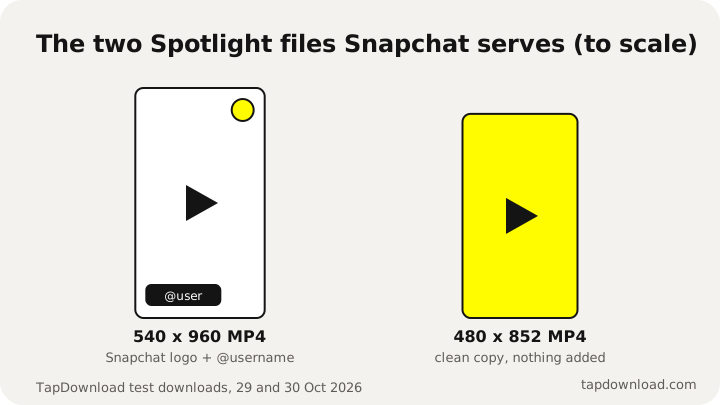
The sliders button next to Save lets you pick either version, or save the sound alone or a GIF. Neither is "HD": these are the largest files Snapchat makes public, and the original upload is encrypted. The Snapchat Spotlight downloader page has more on link formats.
How to see someone's Spotlight on Snapchat
In the app, open their profile; creators with public profiles show their Spotlight videos there. On the web, you can see a public creator's Spotlight videos without an account: type their @username into TapDownload and open the Spotlight tab, next to their story and highlights.
Sources
- Snapchat Support: How We Rank Content on Spotlight
- Snapchat Support: How do I post Snaps to Spotlight?
- Snapchat Support: How do I change the auto-approval setting for my Spotlight comments?
- Snapchat Support: How do I turn off notifications for my Spotlight comments?
- Snap Privacy Center: Privacy by Product
- Business Wire: Snap's Spotlight launch announcement (23 November 2020)
- TapDownload test files, 29 and 30 October 2026