























Snapchat Story Downloader
Type a public @username, or paste a profile or highlight link, and save the photos and videos from its story and highlights.
- Copy the linkin Snapchat
- Paste it hereit opens by itself
- Tap Saveit's on your phone
StoriesHighlightsThe whole story at once
What this Snapchat story downloader does
To download a Snapchat story, type the creator's public @username or paste their profile link and tap Download. TapDownload lists every snap in their public story and highlights. Save one snap, or tick several and get them in one ZIP. Story videos save as 480 x 852 MP4 with sound.
TapDownload is a free website that saves public Snapchat Spotlight videos, stories and highlights from their link. It is not affiliated with Snap Inc.
Public stories are on snapchat.com for anyone to watch, without an account. This Snapchat story downloader opens the same public page and turns every snap into a file you can keep: videos as MP4, photos as JPG. It's also a story saver for public stories that are about to disappear, and a Snap story downloader for anyone who calls the app Snap.
Download a Snapchat story by username
- Type the @username into the box above, for example
@username. A profile link from Snapchat's Share button works too. - Tap Download. The story, highlights and Spotlight videos appear in tabs, with a count for each.
- Save what you want: tap Save on one snap, or tap Download several and choose the Story group to save the whole story as a ZIP.
That's also how to download a video from a Snapchat story on its own: open the snap in the preview and tap Save, and the story video downloads as an MP4 with sound.
You can also download a Snapchat story by link: paste the profile or highlight link instead of the username. It all runs in your browser, with nothing to install.
A Snapchat story saver for stories about to expire
Snapchat's privacy page says most stories are set to delete after 24 hours "unless you change the settings, save the Story to your Public Profile, or you or a Friend saves it in Chat." If a public story matters to you, save it while it's up. As a story saver, TapDownload keeps every snap's order in the file names (the creator's username plus the snap number), so a saved story reads in the right order later.
Download a whole public profile
People search for a "Snapchat profile downloader" when they want everything from one public profile. One @username is enough, and you get all of it in three tabs: the current story, every highlight, and the Spotlight videos. Pick All videos, All photos, a whole group, or any mix, review the list, and save. One ZIP holds up to 25 files, so a big profile arrives in parts.
Which Snapchat stories can you download?
Only stories posted to a public profile: creators, public figures, businesses and anyone else who turned their profile public. Those stories appear on snapchat.com for anyone to watch, without logging in.
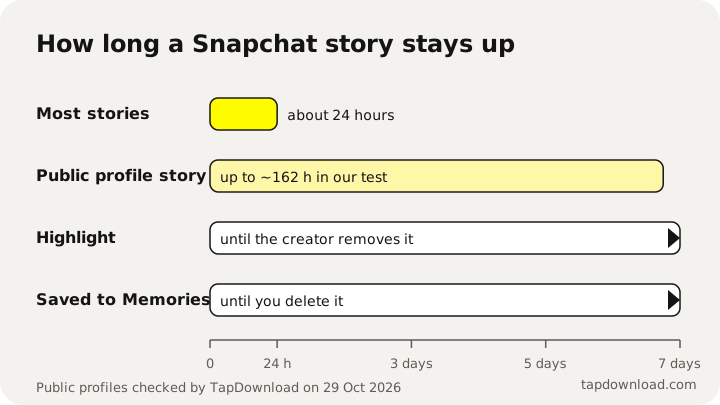
- A public story shows the profile's recent snaps. Snapchat decides how long each one stays: most stories last 24 hours, but public profiles often keep snaps for up to about a week.
- Highlights are stories the owner pinned to their profile. They stay until the owner removes them.
- Friends-only and private stories never appear on the public web, so TapDownload can't open them. It never asks for your login.
Which Snapchat links work?
- The quickest way: type the public @username, like
@username. - From the app: open the profile, tap Share, then Copy link, and paste it here.
- One highlight only: open the highlight, tap Share, then Copy link.
These link shapes all work:
| Link | Looks like |
|---|---|
| Profile | snapchat.com/ or snapchat.com/ |
| Older profile link | story.snapchat.com/ |
| One highlight | snapchat.com/ |
What files do you get?
- Every snap as its own file: videos as MP4 (story videos are 480 x 852) and photos as JPG. Sound is included when the snap has it.
- Story, Highlights and Spotlight in tabs, with how many of each, and a filter for just videos or just photos.
- A preview before you save: tap any snap to watch it, then save it from there or from the grid.
- As many as you want at once: press Download several, tap the snaps or pick a whole group (the story, all videos, all photos, the highlights), check the list and save it as a ZIP.
- The format you want: the sliders button next to Save turns a video into audio only or a GIF, and a photo into PNG or WEBP or a smaller size.
Story questions
Can I download a private Snapchat story?
No. Private and friends-only stories aren't on the public web, and TapDownload never logs in to Snapchat, so it can't see them. Only public profiles work.
How long can I save a Snapchat story?
For as long as Snapchat shows it. Most stories last 24 hours; public profiles often keep story snaps for up to about a week. Highlights stay until the owner removes them.
Will they see my name in their story viewers?
TapDownload opens the public page without a Snapchat account, so there is no username for Snapchat to show. We can't see what Snapchat records on its side, and saving someone's story is still worth asking about first.
Can I download every snap in a story at once?
Yes. Press Download several, pick the Story group, press Review and download. They arrive as a ZIP; one ZIP holds up to 25 files, so a long story comes in parts.
Can I download a Snapchat story in HD?
No downloader can honestly offer HD Snapchat stories, because Snapchat doesn't publish them. Story videos are 480 x 852 MP4 files, the size snapchat.com serves. Highlight photos save at full size, usually 1242 x 2208 or 1320 x 2346.
Can I download a Snapchat story without a watermark?
TapDownload adds nothing to the files. Story snaps save as Snapchat serves them. Spotlight videos are the ones that carry Snapchat's logo, and for those you can pick the copy without it.
Does it save photos as well as videos?
Yes. Photo snaps save as JPG images and video snaps as MP4 files. Each one is labelled, and the Photos and Videos filters show one kind at a time.