How to Save a Snapchat Story
TapDownload is a free website that saves public Snapchat Spotlight videos, stories and highlights from their link. It is not affiliated with Snap Inc.
To save your own Snapchat story, open it from your profile and use Save, which puts it in Memories or your camera roll. To save someone else's public story, type their @username into a story downloader such as TapDownload. No website can save a private or friends-only story.
Which story are you trying to save?
"Save a story on Snapchat" means three different things, and the steps are different for each:
- Your own story. Snapchat gives you a save button for it. You can save the whole story or one snap, and you can set every future story to save itself.
- A friend's story. Snapchat has no button to save a friend's story to your phone. You can save some snaps inside a chat, and you can see them while they're up, but the app is built so that friends' stories aren't kept.
- A public story from a creator or public profile. Public stories are shown on snapchat.com to anyone, without logging in, so they can be saved from the web by @username.
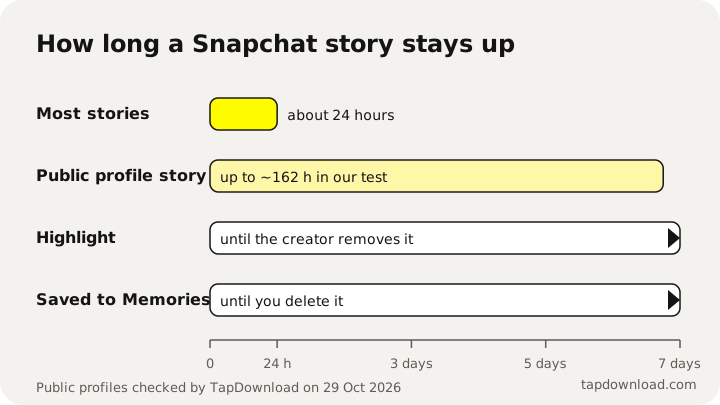
Whichever it is, time matters. Snapchat's privacy page says most stories are set to delete after 24 hours "unless you change the settings, save the Story to your Public Profile, or you or a Friend saves it in Chat." If you want to keep a story, save it the same day.
How to save your own Snapchat story
You can save your story while it's still up, any time in its first 24 hours. Snapchat's help pages describe two versions of the button, depending on your app version.
Save the whole story at once
- Tap your Bitmoji or story icon at the top of the screen to open My Account.
- Press and hold on My Story and tap Save Story.
- If you don't see that, look for the download icon next to your story and tap it.
The whole story is saved as one item in Memories. Snapchat can also save it to your device's camera roll, depending on your Save Button setting (more on that below).
Save one snap from your story
- Open My Account and tap My Story to play it.
- On the snap you want, swipe up and tap the download icon, or press and hold and tap Save Snap.
This is useful when your story has ten snaps and you only want to keep two. One limit from Snapchat's help pages: if you added snaps to someone else's shared story, you can only save the snaps you added yourself.
How do you save stories on Snapchat automatically?
If you post often and want every story kept, turn on auto-save once and forget about it:
- In My Account, tap the gear icon to open Settings.
- Under "App & Privacy", tap My App.
- Under "Customize My App", tap Memories.
- Turn on Auto-Save My Story Snaps.
From then on, every snap you add to your story is copied to Memories. It works for future stories only, so save today's story by hand first.
Where do saved Snapchat stories go?
Saved stories go to Memories, the gallery inside Snapchat. Open it by swiping up from the camera screen. Whether a copy also lands in your phone's gallery depends on the Save Button setting: Settings, My App, Memories, Save Button. The three choices are Memories, Memories & Camera Roll, and Camera Roll.
How to save Snapchat stories to your camera roll
If a story is already in Memories and you want it on your phone:
- Swipe up from the camera to open Memories.
- Press and hold the story and tap Export.
- Choose your camera roll or another place to save it.
To export several at once, tap the selector icon at the top of Memories, pick the stories, and use the options at the bottom of the screen.
Can you save a friend's Snapchat story?
Not to your camera roll, and not with a button. Snapchat lets you watch a friend's story while it's up, but it doesn't offer a "save" option for stories that belong to someone else. This is deliberate: the whole idea of a story is that it goes away.
What you can do:
- Save a snap in Chat. Snapchat's help center explains how to save a snap or a friend's story in a chat with Save in Chat. Only photos set to no time limit and videos set to loop can be saved this way, and the saved item sits in your chat where your friend can see it.
- Ask them. If a friend posted something you want to keep, the honest route is to ask them to send it to you. They have the original, at full quality.
- If their profile is public, their public story can be saved from the web, like any creator's. More on that next.
Screenshots are possible, because Snapchat says anyone can take a screenshot or record a story. But on your friends-only story, Snapchat shows the owner whether a screenshot was taken. Our guide to story views and screenshots explains who sees what.
How to save a public Snapchat story
Creators, public figures, businesses, and anyone who turned on a public profile post stories that appear on snapchat.com for everyone. You can watch them in a browser without a Snapchat account, which also means you can save them from the web:
- Find the creator's @username, or open their profile in Snapchat, tap Share and Copy link.
- Type the @username or paste the link into the box at the bottom of this page and tap Download.
- TapDownload shows their story, their highlights and their Spotlight videos in tabs. Tap any snap to preview it, then tap Save.
Save the whole story in one go
Tap Download several, choose the Story group, check the list, and save. The snaps arrive as a ZIP file, up to 25 files per ZIP, so a long story comes in parts. Inside, each snap keeps its own file name with the creator's username and the snap number, so the order is easy to follow.
What the saved story looks like
| Part of the story | File |
|---|---|
| Video snaps | MP4, 480 x 852, with sound |
| Photo snaps | JPG (PNG or WEBP if you choose) |
| Highlight photos | JPG at full size, 1242 x 2208 or 1320 x 2346 |
These are the files Snapchat serves for public stories. They aren't "HD". Snapchat compresses story videos for mobile data, and every downloader receives the same files.
Why private stories can't be saved by any website
A private story, a friends-only story, or a story shared with a custom list never appears on the public web. It only exists inside the Snapchat app, for the accounts it was shared with. A website can only show what snapchat.com shows to someone who isn't logged in, and for a private profile that is nothing.
You will find sites and apps that promise a "private story viewer" or "private story downloader". They can't do it. The usual pattern is a page that asks you to fill in surveys, install something, or log in with your Snapchat password. Never give your Snapchat password to a third-party site. TapDownload never asks for it, and neither should anything else.
Can you save a story after 24 hours?
Only if it was kept: your own story if it went to Memories, a public creator's while it is still on their profile or in a highlight. A friend's private story is gone once it expires.
- Your own: yes, if it was saved to Memories, either by hand or by auto-save. If it wasn't saved, Snapchat deletes it when it expires, and there's no way to bring it back.
- A public creator's: sometimes. Snapchat says most stories delete after 24 hours unless you change the settings, and public profiles can keep snaps up longer. Public profiles often keep story snaps for up to about seven days. Anything the creator added to a highlight stays until they remove it.
- A friend's, private: no. Once it expires, it's gone for you.
For more on finding older stories, yours or anyone's, see how to view old Snapchat stories.
How to save Snapchat stories on a computer
On a laptop or desktop there are two routes, one for each kind of story.
- Your own stories: Snapchat's My Data page at accounts.snapchat.com can export all your Memories, including the stories you saved there, as one download. Snapchat's own tip is to use a computer for it. The full steps are in how to download all your Snapchat Memories.
- Public stories: open TapDownload in your browser, type the creator's @username and save the snaps. The files go to your computer's Downloads folder, the same as on a phone.
Snapchat Web, the browser version of the app, is made for chats and calls. It doesn't add a way to save other people's stories.
What saving a story can't do
It's worth knowing the limits before you spend time on a workaround that doesn't exist:
- It can't bring back an expired story that was never saved. Snapchat deletes it, and its help pages describe no way to bring it back.
- It can't save a friends-only or private story from the outside. Only the people it was shared with can watch it, in the app.
- It can't save a Live. Snapchat Lives stream inside the app and have no public web link.
- It can't make a story sharper. Public story videos are 480 x 852. What you save is what Snapchat serves.
- It can't hide a screenshot. On friends-only stories, the owner can see when a screenshot was taken.
A quick checklist before you save
- Is it yours? Use Save Story or the download icon in My Account.
- Do you want it on your phone? Set the Save Button to Memories & Camera Roll, or export it from Memories.
- Is it a public creator's? Type their @username into TapDownload and save one snap or the whole story.
- Is it a friend's private story? Ask them to send it to you. No tool can download it.
- Is it about to expire? Save it now. Stories that expire unsaved can't be recovered.
Sources
- Snapchat Support: How to Save My Story on Snapchat
- Snapchat Support: How do I save a Snap or Story to Memories?
- Snapchat Support: How do I get My Story Snaps to auto-save to Memories?
- Snapchat Support: How to Save a Snap or Friend's Story in Chat
- Snapchat Support: How do I download a Snap from Memories?
- Snap Privacy Center: Privacy by Product
- TapDownload test files, 29 and 30 October 2026