How to Save Snapchat Videos
TapDownload is a free website that saves public Snapchat Spotlight videos, stories and highlights from their link. It is not affiliated with Snap Inc.
There are four ways to save a Snapchat video. Save your own snap to Memories before you post it. Save a story you posted. Save public Spotlight videos and stories from their link with TapDownload. A video sent to you can be saved in the chat only if it was set to loop, and the sender can see it.
The four ways to save a Snapchat video
How you save a Snapchat video depends on whose video it is and where you found it. Your own snaps are easy: Snapchat has a save button for them. Public videos from other people, like Spotlight posts and public stories, can be saved from their link. Videos that a friend sends you in a chat are the strict case: Snapchat only lets you keep some of them, and the sender can see what you kept.
| The video | How to save it | Where it goes | Who is told |
|---|---|---|---|
| Your snap, before you send it | The download icon on the preview | Memories, camera roll or both | Nobody |
| Your story, after you post it | Save Story, or save one snap | Memories and camera roll | Nobody |
| Someone's public Spotlight, story or highlight | Paste the link into TapDownload | Your Downloads folder | Not by name (no login) |
| A video someone sent you | Save in Chat (only looping videos) | The chat | The sender sees it |
The rest of this guide walks through each one, then covers the camera roll, Snapchat Web, and the reasons a video sometimes won't save. Snapchat moves buttons around from time to time, so if a menu looks different on your phone, the names in bold are the ones to look for.
1. Save your own snap before you send it
This is the simplest way to save a Snapchat video, and the one most people need. When you record a video snap, Snapchat shows you a preview before you send or post it. At the bottom of that preview there is a download icon (an arrow pointing down into a tray). Tap it and the video is saved.
- Open the camera and hold the round button to record a video.
- On the preview, add any text, stickers or sound you want. They will be saved too.
- Tap the download icon at the bottom of the screen.
- Send or post the snap as usual, or close it. The saved copy stays.
Where does the saved video go?
By default, saved snaps go to Memories, Snapchat's own gallery, which you open by swiping up from the camera screen. You can change this so videos land in your phone's gallery as well. Snapchat calls this setting the Save Button:
- In My Account, tap the gear icon to open Settings.
- Scroll to "App & Privacy" and tap My App.
- Under "Customize My App", tap Memories.
- Tap Save Button and choose Memories, Memories & Camera Roll, or Camera Roll.
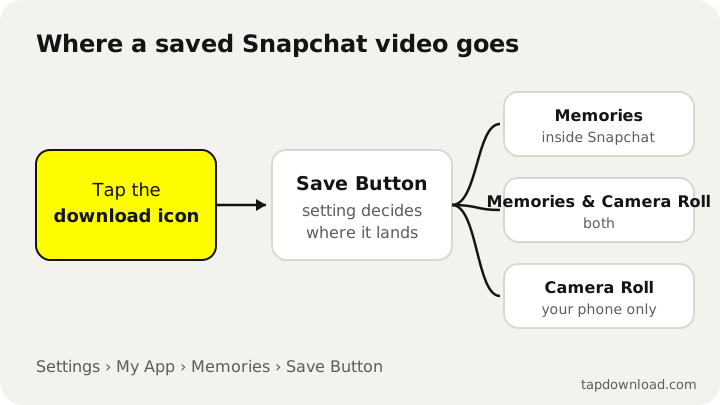
If you want every saved snap on your phone straight away, pick Memories & Camera Roll. You get a copy in Snapchat and a copy in your Photos or Gallery app. Pick Camera Roll alone if you'd rather keep nothing inside Snapchat.
2. Save a story you already posted
If you posted a video to your story and didn't save it first, you can still save it while the story is up. Snapchat says most stories are set to delete after 24 hours unless you change the settings, so do this the same day.
Save the whole story
- Tap your Bitmoji or story icon at the top to open My Account.
- Press and hold on My Story, then tap Save Story. In some versions of the app you tap the download icon next to your story instead.
Save one video from your story
- Open My Account and tap My Story to play it.
- On the video you want, swipe up and tap the download icon. Some versions show Save Snap when you press and hold instead.
Snapchat saves your story to Memories and can also put it in your camera roll, depending on your Save Button setting. One limit: if you added snaps to someone else's shared story, you can only save the snaps you added yourself.
Save every story automatically
If you'd rather not think about it, turn on auto-save. Go to Settings, My App, Memories, and switch on Auto-Save My Story Snaps. From then on, every snap you add to your story is copied into Memories. The story saving guide covers this in more detail.
How to save a Snapchat video to your camera roll
A video in Memories isn't in your phone's gallery yet. To get it onto your phone, so you can post it elsewhere or send it in another app, export it:
- Swipe up from the camera screen to open Memories.
- Press and hold the video and tap Export.
- Choose where to save it, for example your camera roll or Files.
To export several videos at once, tap the selector icon at the top of Memories, tap each video you want, and use the export options that appear at the bottom of the screen. Once the Save Button is set to Memories & Camera Roll, new snaps skip this step and go to your phone automatically.
In short, to save a Snapchat video to your phone: export it from Memories, or set the Save Button so your phone gets a copy every time.
3. Save someone else's public video
Spotlight videos, public stories and highlights on public profiles can be watched by anyone on snapchat.com, with no account and no login. Because they are public web pages, they can also be saved from their link. This is how you save a video from Snapchat that isn't yours, and it is what TapDownload does. New to Spotlight? What Snapchat Spotlight is explains the feed.
- In Snapchat, open the Spotlight video, story or highlight, tap Share, then Copy link. For a public story you can just remember the creator's @username.
- Paste the link, or type the @username, into the box at the bottom of this page and tap Download.
- TapDownload lists the videos and photos it found. Tap Save on any video to get it as an MP4 with sound.
To download several Snapchat videos at once, tap Download several, pick the videos (or a whole group such as "all videos" or "the story"), check the list, and save them as a ZIP file. One ZIP holds up to 25 files, so a long story arrives in parts.
What you get: the real files
TapDownload saved public videos on 29 and 30 October 2026 and measured what came back. These are the files Snapchat itself serves. Nothing is upscaled or re-encoded.
| Video | Size | Notes |
|---|---|---|
| Spotlight, main file | 540 x 960 MP4 | With sound. Snapchat adds its logo and the creator's @username. |
| Spotlight, clean copy | 480 x 852 MP4 | A copy Snapchat keeps without the logo and @username. |
| Public story video | 480 x 852 MP4 | With sound when the snap has sound. |
| Highlight video | MP4 | Sound at 128 kbps instead of the 48 kbps preview the page plays. |
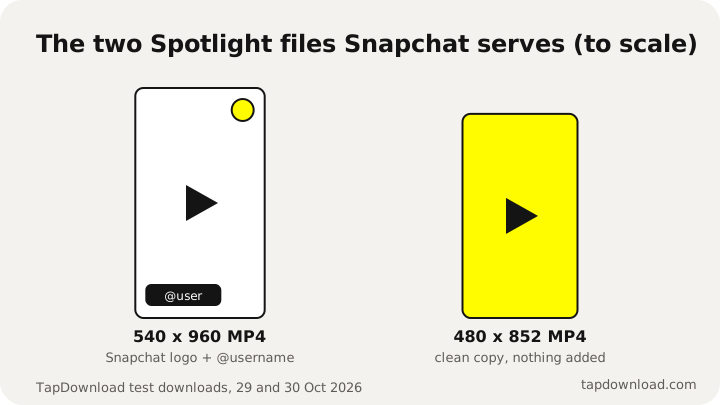
Each video can also be saved as audio only (AAC, the sound copied without re-encoding) or as a GIF. The sliders button next to Save shows the versions Snapchat really keeps for that video, with the true file size of each.
4. Save a video someone sent you
Videos sent to you in a chat follow different rules, because Snapchat is built around snaps that disappear after they're opened. You can only save a video snap if the sender set it to loop (the ∞ timer icon). Photos have to be set to no time limit for the same reason.
- Open the chat with your friend.
- Press and hold the video and tap Save in Chat. If you're watching it full screen, swipe up and tap Save in Chat.
The saved video stays in the chat as chat media. It isn't hidden: it sits in the conversation where your friend can see it, and Snapchat's help pages say either of you can delete saved content in a one-to-one chat. If a timed snap closes before you save it, it's gone. There is no button to get it back.
What about screenshots and screen recording?
Snapchat's own privacy page says that "recipients can always take a screenshot". It doesn't stop you. But it does tell people: a screenshot of a snap or chat shows up as a notice to the sender, and screenshots of your friends-only story show in your viewer list. Whether screen recording does the same isn't covered by Snapchat's help pages. We cover what each person can see in our guide to story views and screenshots.
We don't publish tricks for saving private snaps without the sender knowing. If you want to keep a video a friend sent you, ask them to send it on loop, or to send you the file another way.
Can you download videos from Snapchat Web?
Snapchat Web, at web.snapchat.com, is made for chats and calls on a computer. When Snap launched it in 2022, the company said it would hide snaps when you click to another window and would block screenshots. It isn't a way to download videos that were sent to you.
For public videos it doesn't matter which device you use. On a laptop, copy the Spotlight or story link from snapchat.com (or from the app on your phone), paste it into TapDownload in your browser, and the MP4 lands in your computer's Downloads folder. The same works on iPhone and Android: on a phone, the file goes to your Downloads, and from there you can move it to your gallery.
When a Snapchat video won't save
If saving fails, it's almost always one of these:
- The snap wasn't set to loop. Timed video snaps in a chat can't be saved in Chat. Only looping ones can.
- The story is private or friends-only. Only public profiles appear on snapchat.com, so no website can open a friends-only story. Tools that promise otherwise are not telling the truth.
- It was a Live. Snapchat Lives play inside the app and have no public web link, so they can't be saved from a link.
- The story already expired. Once a story is gone from the public profile, it can't be fetched. Highlights stay until the owner removes them.
- Your Memories aren't backed up. If Backup Progress shows "Snaps Remaining" or "No Network Connection", connect to Wi-Fi and wait before switching phones.
- Your camera roll is blocked. If Snapchat can't save to your gallery, check that your phone allows Snapchat to access Photos (in your phone's settings, under Snapchat).
- Your Memories are over 5GB. Snapchat now limits free Memories storage to 5GB. Saving still works, but read our Memories guide to see what changes from January 2027.
Why saved Snapchat videos look blurry
Snapchat compresses videos to keep them quick on mobile data. The largest public Spotlight file we found is 540 x 960, and public story videos are 480 x 852. That is what every downloader receives, because it is what Snapchat serves. Any site that labels these "HD" or "original quality" is making it up. The original upload Snapchat keeps for Spotlight is encrypted, and the key isn't public.
Your own snaps are different: a video you save to Memories or your camera roll before sending is your own recording, so it keeps the quality Snapchat's camera recorded. If quality matters, save your own videos at the source rather than downloading them later.
How to download everything from Snapchat
There is no single button that saves every video on Snapchat, and for other people's content there shouldn't be. For your own account, Snapchat offers a full export called My Data, which can include all of your Memories in one download. It's free, and the steps are in how to download all your Snapchat Memories.
Sources
- Wikipedia: Snapchat (screenshot notifications)
- Snapchat Support: How do I save a Snap to Memories and Camera Roll?
- Snapchat Support: How do I save a Snap or Story to Memories?
- Snapchat Support: How to Save My Story on Snapchat
- Snapchat Support: How do I download a Snap from Memories?
- Snapchat Support: How to Save a Snap or Friend's Story in Chat
- Snap Privacy Center: Privacy by Product
- TechCrunch: Snap launches Snapchat for Web (18 July 2022)
- TapDownload test files, 29 and 30 October 2026