How to Download All Your Snapchat Memories
TapDownload is a free website that saves public Snapchat Spotlight videos, stories and highlights from their link. It is not affiliated with Snap Inc.
To download all your Snapchat Memories, go to accounts.snapchat.com or Settings, then My Data, turn on Export your Memories, tap Request Only Memories, pick a date range and submit. Snapchat emails a link. Open index.html from the zip on a computer and download everything from the Memories page.
Why so many people are downloading their Memories
Snapchat Memories used to be free and unlimited. In September 2025 Snap announced Memories Storage Plans: every account now gets 5GB of Memories storage for free, and more space is paid. Snap's announcement also noted that Snapchatters have saved more than a trillion Memories since the feature launched in 2016, so a lot of people suddenly wanted their photos and videos somewhere safe.
The good news first. Snapchat's help page on Memories storage says: "Snapchat will not automatically delete your Memories because you do not upgrade." Snap says that for "the vast majority of Snapchatters, who have less than 5GB of Memories, nothing will change." And downloading your Memories is free for everyone. This guide shows how, then explains exactly what the 5GB limit means.
How to download all Snapchat Memories with My Data
The only way to download all your Memories at once is Snapchat's own export, called My Data. It's free, it doesn't need Snapchat+, and Snapchat's own tip is to use a computer rather than a phone.
- Log in at accounts.snapchat.com. You can also open it from the app: go to Settings and select My Data.
- Click My Data.
- Under "Select data to include", turn on Export your Memories.
- Click Request Only Memories. This keeps the export to your photos and videos, without chat logs and account data.
- Choose a date range, or turn the date range off to include everything. Longer ranges take longer to prepare.
- Confirm the email address Snapchat should notify.
- Click Submit at the bottom of the page.
- When the email arrives, or from your recent exports on the My Data page, select See exports, then Download.
- Unzip the file by double-clicking it.
- Double-click index.html to open it in your browser.
- Click Memories in the left-hand menu.
- Download your Memories one at a time, or all of them at once.
How long does the Snapchat data download take?
Snapchat says it strives "to deliver data within 7 days, but large downloads can take longer." Small exports often arrive much faster. The time depends on how much you selected and how much data your account holds, which is one more reason to choose Request Only Memories if Memories are all you need.
What's in the download
A Memories export arrives as a zip file. Inside is a small web page (index.html) that lists your Memories, with links to each photo and video. Opening it in a browser on your computer is the easiest way to see and save everything. A full My Data export, without the Memories-only option, also includes other account data such as your settings and history, which is useful if you're leaving Snapchat.
How to save a few Memories to your camera roll
If you only need some Memories on your phone, you don't need the full export:
- Swipe up from the camera screen to open Memories.
- Press and hold a snap and tap Export, then choose where to save it, such as your camera roll.
- To save several at once, tap the selector icon at the top of Memories, tap the snaps you want, and use the export options at the bottom of the screen.
This is handy for a handful of photos. For hundreds or thousands of Memories, My Data is far quicker, and it's the better backup because it gives you the files on a computer.
How to save all Memories on Snapchat to your camera roll
There's no single "save all to camera roll" button in Memories. You have two options. Select many snaps with the selector icon and export them in batches, which works but is slow for large libraries. Or download everything with My Data on a computer, then copy the files to your phone, or add them to the cloud photo service your phone already uses (iCloud Photos or Google Photos), so they appear in your gallery.
Make new snaps go to your camera roll too
To stop relying on Memories alone, change where new snaps are saved: Settings, My App, Memories, Save Button, then choose Memories & Camera Roll. Every snap you save from then on gets a copy on your phone as well.
Snapchat Memories storage: the 5GB limit and the plans
Every account gets 5GB of Memories storage free. In the US, 100GB costs $1.99 a month or $20 a year; Snapchat+ typically includes 250GB and Snapchat+ Platinum 5TB. Here is Snapchat's help page in table form:
| Option | Memories storage | Price (US) |
|---|---|---|
| Free | Up to 5GB | Free |
| Memories-only plan | 100GB | $1.99 a month or $20 a year |
| Snapchat+ | Typically 250GB | Part of the Snapchat+ subscription |
| Lens+ | Same as Snapchat+ | Part of the Lens+ subscription |
| Snapchat+ Platinum | 5TB | Part of the Platinum subscription |
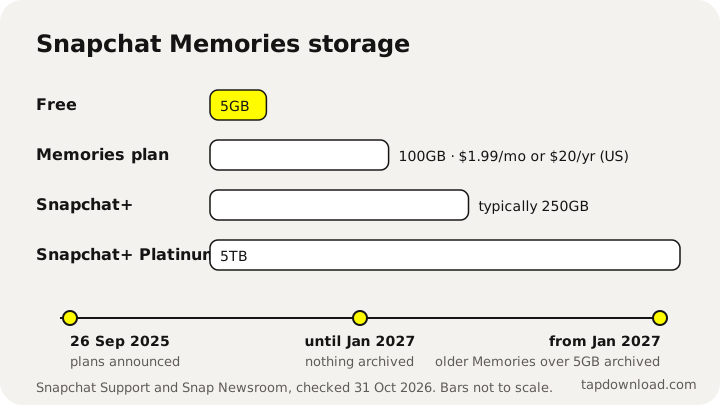
The 100GB price is the US price on Snapchat's help page; Snapchat says plans can be paid monthly or yearly, and prices in other countries differ. Snapchat+ and Platinum are general subscriptions with many other features, so we haven't listed their prices as storage prices. Check the current price in the app under Upgrade Storage before you buy anything.
Is Snapchat charging for Memories?
Only for storage above 5GB, and only if you want to keep those extra Memories inside Snapchat with full access. Under 5GB, nothing changes. Over 5GB, you have a choice: pay for a plan, or download your Memories with My Data and keep them yourself, which is free.
Is Snapchat deleting Memories?
No, not in the sense most people fear. Snapchat's help page is direct: "Snapchat will not automatically delete your Memories because you do not upgrade." What changes is access to some older Memories, and not before 2027:
- When Snap announced the plans on 26 September 2025, it said it would provide 12 months of temporary storage for Memories over the 5GB limit.
- Snapchat's help page says "No Memories will be archived before January 2027".
- From January 2027, Memories that are more than one year old and are not part of your oldest 5GB will be archived. Archived Memories show as thumbnails, and you need an upgrade to open, edit or share them.
- Your recent Memories from the past year, and your oldest 5GB, stay fully accessible.
- Snapchat says you can access archived Memories by subscribing, or by downloading your Memories to use them outside the app.
So the honest answer to "when is Snapchat deleting Memories" is: it isn't deleting them, and archiving doesn't start before January 2027. If you're over 5GB and don't want to pay, download everything with My Data before then and you lose nothing.
The Snapchat Memories update, in a timeline
Most of the worry online comes from mixing up the dates. Here they are in order, from Snap's announcement and Snapchat's help page:
| When | What happens |
|---|---|
| 2016 | Memories launches. Saving was free with no stated limit. |
| 26 September 2025 | Snap announces Memories Storage Plans: 5GB free, with paid plans for more. Accounts over 5GB get 12 months of temporary storage. |
| From then on | You can buy more space under Upgrade Storage, or download your Memories for free with My Data. |
| Before January 2027 | No Memories are archived. |
| From January 2027 | Memories over the free limit that are more than a year old, and not in your oldest 5GB, will be archived (shown as thumbnails until you upgrade or download them). |
Is Snapchat getting rid of Memories?
No. Memories is still part of the app, and saving still works. What changed is that storage above 5GB is now something you pay for, or keep yourself by downloading it. Snapchat says it will give advance notice in the app before anything changes for your account.
When did Snapchat start charging for Memories?
The plans have been available since Snap's announcement in September 2025. Nobody has to pay: under 5GB nothing changes, and over 5GB you can download your Memories for free instead. Paying only matters if you want to keep more than 5GB of older Memories fully usable inside Snapchat after January 2027.
How to check your Snapchat Memories storage
- In My Account, tap the gear icon to open Settings.
- Scroll to My App.
- Tap Memories and look under Cloud Storage.
If you have more than 5GB saved, Snapchat also shows a notice with your usage in the Memories section. The same Memories settings screen is where you manage or cancel a Memories-only plan.
How to find and get to your Memories on Snapchat
On the camera screen, swipe up. That opens Memories, where your saved snaps and stories are kept. From there you can scroll back through time, search, open a snap, or press and hold for options such as Export.
You can't open Memories on snapchat.com or from another website. To view Snapchat Memories on a PC, download them with My Data and open the index.html file on your computer, as described above.
How to back up Snapchat Memories
"Backing up" Memories means two different things, and it's worth doing both:
- Snapchat's own backup: Memories are uploaded to your Snapchat account so they survive a new phone. Check it at Settings, My App, Memories: Backup Progress should say "Complete". A backup icon on a snap in Memories means that snap isn't backed up yet. If it says "Snaps Remaining" or "No Network Connection", connect to Wi-Fi and wait.
- Your own copy: the My Data export gives you the actual files, to keep on a computer, an external drive or a cloud drive. This is the copy that doesn't depend on your Snapchat account or storage plan.
One thing Snapchat makes clear: Memories that weren't backed up can't be recovered. And Snapchat doesn't back up your camera roll into Memories, so photos you only have on your phone need your phone's own backup.
Can you recover deleted Snapchat Memories?
Snapchat's help pages say it's "not possible to recover lost Memories that weren't successfully backed up", and they don't describe a way to bring back a Memory you deleted yourself. Before you delete anything, or clear out space to get under 5GB, download your Memories first. If you're looking for a lost Memory, check your phone's gallery (in case your Save Button included the camera roll) and any old My Data exports you made.
Can people see your Memories on Snapchat?
No. Memories are private to your account. Nobody else can browse them unless you send or post a snap from Memories yourself. For extra privacy, Snapchat's My Eyes Only keeps chosen Memories behind a passcode; Snapchat's privacy page says that without the password, "no one can view these things after they are saved in My Eyes Only — not even us!"
That also means no outside website can download your Memories for you. TapDownload only reads public pages on snapchat.com, and Memories are never public. Any site that offers to download your Memories by asking for your Snapchat password is a risk to your account. Use Snapchat's My Data instead.
Sources
- Snapchat Support: How do I download my data from Snapchat?
- Snapchat Support: How do I manage my Memories storage?
- Snap Newsroom: Introducing Memories Storage Plans (26 September 2025)
- Snapchat Support: How do I download a Snap from Memories?
- Snapchat Support: How do I save a Snap to Memories and Camera Roll?
- Snapchat Support: How do I make sure my Memories are backed up?
- Snap Privacy Center: Privacy by Product