How to Download GIFs from Twitter (X)
TapDownload is a free website that saves public Snapchat, TikTok and X videos and photos from their link. It is not affiliated with Snap Inc., TikTok or X Corp.
To download a Twitter GIF, copy the post's link, paste it into TapDownload and save it. X keeps GIFs as short, silent MP4 videos, so you get an MP4 by default, which is small and sharp. For a real .gif file, tap the sliders button and pick GIF: your browser makes it from the first 10 seconds.
Why are Twitter GIFs really MP4 videos?
When you post a GIF on X, or pick one from the GIF button, X doesn't keep it as a .gif file. It stores and plays it as a short video with no sound that loops by itself. That's why a "Twitter GIF downloader" usually hands you an MP4, and why right-clicking a GIF in the browser never offers "Save image".
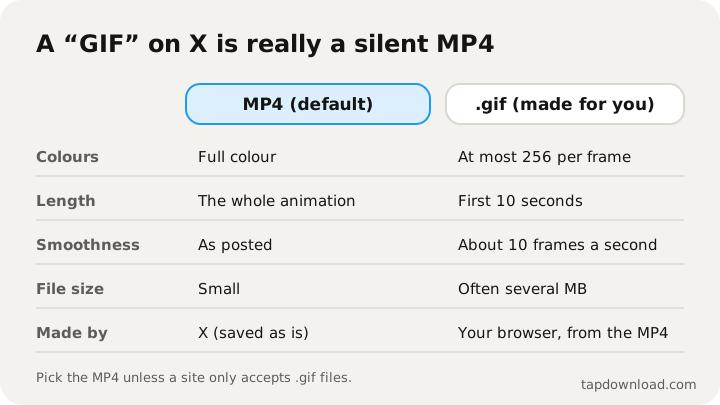
X does this for good reasons. A GIF is an old format: it stores every frame as a picture with at most 256 colours, so animated GIFs are huge and often look grainy. The same animation as an MP4 is many times smaller and keeps full colour. TapDownload sees it the same way X does: the post's data marks it as an animated GIF, and the files behind it are MP4s.
So the real question is which file you want:
| MP4 (default) | GIF (made in your browser) | |
|---|---|---|
| What it is | X's own file, saved as it is | A new .gif made from the MP4 |
| Quality | Full colour, sharp | At most 256 colours, about 10 frames a second |
| Length | The whole animation | The first 10 seconds |
| File size | Small | Often several MB |
| Best for | Phones, chats, video apps, editing | Places that only accept .gif: some forums, slides, older apps |
How do I save a GIF from Twitter without Premium?
- Copy the post's link. In the X app, tap the Share icon under the post with the GIF, then Copy link. On a computer, open the post and copy the address from the browser bar. x.com and twitter.com links both work.
- Paste it into TapDownload. Open the X (Twitter) video downloader. Opening the GIF tab above the box first makes GIF the chosen format.
- Save it. Tap Save for the MP4. For a .gif, tap the sliders button, choose GIF, pick 480 px wide (sharper, bigger file) or 320 px wide (smaller), then Make GIF. A counter shows the progress while your browser builds it.
Nothing is uploaded when a GIF is made: TapDownload passes X's MP4 to your browser, and the GIF encoder runs inside the page.
Should I save the MP4 or a GIF?
Pick the MP4 unless something forces you to use .gif. It's smaller, sharper, the whole length, and every phone, chat app and editor plays it. WhatsApp, Telegram, Discord and iMessage all play short MP4s, and some chat apps turn GIFs into MP4s behind the scenes anyway.
Pick GIF when the place you're posting only takes .gif files: some forums and message boards, older chat tools, a few slide and email tools. Keep in mind that a .gif is limited to 256 colours, so photos and gradients look speckled, and long animations get very big. TapDownload uses the first 10 seconds at about 10 frames a second to keep the file reasonable.
Can I make a GIF from any X video?
The GIF option isn't only for GIF posts. Any public video on X can become a .gif: paste the video post's link, tap the sliders button, choose GIF and a width, then Make GIF. TapDownload uses the first 10 seconds at about 10 frames a second, without sound, which suits reactions and short moments. For a different part of the video, save the MP4 first, trim it in your phone's Photos app or a video editor, and turn the trimmed clip into a GIF there.
How do I convert a Twitter GIF to MP4, or MP4 to GIF?
Because X stores GIFs as MP4s, "converting a Twitter GIF to MP4" needs no conversion at all: saving the post gives you the MP4 X already has, untouched. The other direction is a real conversion. Going from MP4 to GIF means redrawing every frame with a 256-colour palette, which TapDownload does in your browser with an open-source GIF encoder. That's why the GIF takes a few seconds to make and why the MP4 is ready instantly. So TapDownload works as a Twitter GIF saver and a Twitter GIF converter in one.
Should my GIF be 480 or 320 pixels wide?
| Width | Looks | File size | Use it for |
|---|---|---|---|
| 480 px | Sharper | Bigger, often several MB for 10 seconds | Forums, slides, documents |
| 320 px | Softer | Roughly half the size | Chats, email, places with upload limits |
If a site rejects your GIF for being too big, try 320 px. If it still is, the animation is probably long or very busy; trim it first, or post the MP4 if the site accepts video.
How do I save a GIF from Twitter to Discord, WhatsApp or iMessage?
- WhatsApp and Telegram: send the MP4. Both play short silent videos as looping GIFs.
- Discord and Slack: both accept .gif files and short MP4s; a .gif plays inline everywhere, an MP4 may need a tap.
- iMessage: a .gif animates in the conversation; an MP4 shows as a video.
- Instagram and TikTok: they take videos, not GIF files, so upload the MP4.
- Back on X: you can attach a .gif or the MP4 to a post; X turns either into its own looping video.
Do downloaded GIFs loop?
A .gif file loops by itself wherever it's shown. An MP4 loops only where the player is set to loop: chat apps and X itself loop short silent videos, while a video player on your computer usually plays it once. In QuickTime (Mac) you can turn on View, Loop; in VLC, click the loop button. If you're putting it on a web page, the video tag's loop and autoplay settings make an MP4 behave just like a GIF, at a fraction of the size.
Where do I find a GIF on X to save?
GIFs on X show a small GIF badge in the corner while they play in the timeline. That badge is the quick way to tell a GIF from a short video: a GIF never has sound and never shows a play bar. To save one, open the post that contains it (tap the post's text, not the GIF, so the GIF doesn't go full screen) and copy that post's link. If you found the GIF in a reply, copy the reply's link, because the GIF lives in the reply.
Why does a .gif look grainier than the MP4?
A .gif can only hold 256 colours per frame. Cartoons, text and flat graphics survive that well. Photos, skin tones, gradients and dark scenes don't: the encoder has to pick the closest of its 256 colours for every pixel, which shows up as speckles or bands. TapDownload builds a fresh palette for the GIF to keep it as clean as the format allows, but if the result looks rough, that's the format, not the source. The MP4 is always the better-looking copy.
Can I save several GIFs at once?
A post on X can hold one GIF, or a mix of photos and videos. If a post has several items, TapDownload lists each one: save them one by one, or tap Download several and choose Everything to get them all in one ZIP. For GIFs from different posts, paste each post's link in turn; each takes a few seconds.
How do I save a GIF from Twitter on iPhone or Android?
- iPhone: Safari saves the MP4 or GIF in the Files app, in Downloads. To put it in Photos, open it, tap Share, then Save Video (MP4) or Save Image (GIF). A .gif saved to Photos animates in the Animated album. Full steps in how to save Twitter videos on iPhone.
- Android: Chrome saves to Downloads. Google Photos and most gallery apps play both files.
- Computers: the Downloads folder. Drag a .gif straight into a chat, a document or a slide.
Do Twitter GIFs have sound?
No. GIFs on X are silent by design, so there's no audio to keep. If you pick MP3 or AAC on a GIF post, TapDownload tells you the video has no sound track. If an X post with what looks like a GIF does have sound, it's a regular video, not a GIF, and you can save its sound as MP3 like any video: see how to download videos from X.
Why won't a Twitter GIF download?
- The link points to the GIF picker, not a post. GIFs in X's GIF search aren't posts yet. Find a post that uses the GIF and copy that post's link.
- The account is protected, or the post was deleted. Protected and deleted posts aren't on the public web.
- X hides the post from logged-out visitors, which happens with some sensitive or age-restricted posts.
- The GIF is from another site. Some posts link out to a GIF host. Save it from that site instead.
Can I reuse GIFs from X?
Many GIFs on X come from GIF libraries and are meant to be shared, but a GIF someone made from their own video, art or photos belongs to them. Reacting with a GIF in a chat is ordinary use. Using someone's original animation in your own work, brand or product is different: ask first and credit them. TapDownload isn't affiliated with X Corp, and it only reads what X shows to anyone who opens the public link (about TapDownload). More help: saving X photos in full size and all guides.