How to Save Twitter Videos on iPhone
TapDownload is a free website that saves public Snapchat, TikTok and X videos and photos from their link. It is not affiliated with Snap Inc., TikTok or X Corp.
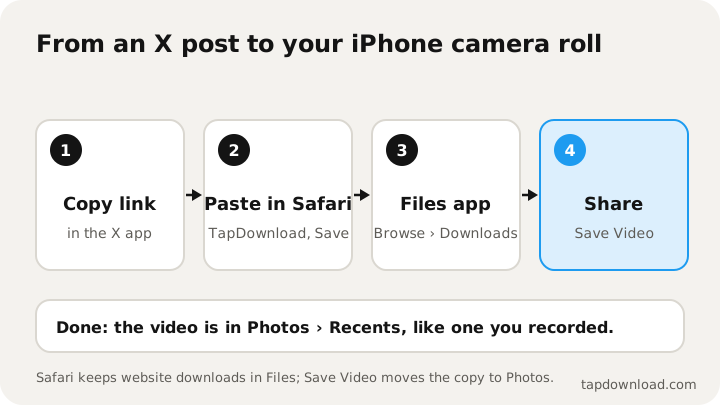
To save Twitter videos on iPhone, copy the post's link in the X app (Share, then Copy link), paste it into TapDownload in Safari and tap Save. Safari puts the MP4 in the Files app; open it, tap Share, then Save Video, and it's in your camera roll. X Premium subscribers can also use the three-dot menu, then Download video.
How do you save Twitter videos on iPhone?
An iPhone gives you two routes from an X post to your camera roll. X's own Download video option drops the video straight into Photos, but it needs a paid X plan and only works on posts whose uploader allows it. Saving from the link in Safari works for any public video with no account, but iOS keeps every browser download in the Files app first, so there's one extra tap to get it into Photos.
| X app: Download video | Safari + TapDownload | |
|---|---|---|
| Needs | A paid X plan | Nothing, no account |
| Works on | Videos from 25 July 2023 with downloads allowed | Any public post with a video |
| Lands in | Photos | Files, then Photos in one tap |
| Choose the size | No | Yes, Full HD by default, up to 4K |
| Sound only (MP3) | No | Yes |
Below are both routes step by step, then the fixes for the two problems iPhone users hit most: a video that "saved" but isn't in Photos, and a Download option that isn't there.
How do I save an X video with Premium?
If you pay for X Premium or another X plan, X's help page gives these steps:
- Go to the video you'd like to download.
- Tap the three-dot icon in the top right corner.
- Tap Download video.
The video goes to your camera roll. If iOS asks whether X may add to your photos, allow it. Without that permission, the download can't land in Photos.
X explains why the option is sometimes missing: the uploader turned off Allow video to be downloaded when posting (a choice that can't be changed afterwards), the video was posted before 25 July 2023, or the uploader's account is under 18, where downloads are always off.
How do I save a Twitter video in Safari without Premium?
- Copy the link. In the X app, tap the Share icon under the post (the arrow pointing up), then Copy link. If someone sent you the link in Messages or WhatsApp, press and hold it and tap Copy.
- Open TapDownload in Safari. Go to the X (Twitter) video downloader. Tap the box, then Paste. The search starts by itself.
- Tap Save. Safari asks whether you want to download the file. Tap Download. A small download icon appears next to the address bar while it saves.
That's how to download Twitter videos on iPhone without Premium, and even without the X app if someone sent you the link; the next step saves videos from X to the camera roll. The video is saved, but in the Files app, not Photos. Apple keeps every website download in Files: Safari can't put files in your camera roll by itself.
How do I move an X video from Files to my camera roll?
- Open the Files app (the blue folder icon).
- Tap Browse, then Downloads. Apple's help page notes that if you don't see Downloads there, it's inside iCloud Drive.
- Tap the video to open it.
- Tap the Share button (the square with an arrow), then Save Video.
It's now in Photos, under Recents. A quicker way: tap the download icon next to Safari's address bar, tap the file in the list, then Share and Save Video, without opening Files at all.
The file name starts with tapdownload and the poster's username, so it's easy to find in Downloads if you saved several.
How do I save a video from X to my iPhone without the X app?
You don't need the X app at all. If someone sends you an X link in Messages, WhatsApp or email, press and hold the link, tap Copy, then paste it into TapDownload in Safari. If you're browsing x.com in Safari, open the post and copy the address from the address bar (tap it once to select it). Either way, the video saves to Files and moves to your camera roll with Share, then Save Video.
Can I save a video from an X Direct Message on iPhone?
Only inside the X app. Direct Messages are private, so no website can open them. X's help page says that from app version 10.24 you can press and hold a video in a DM and tap Download video, unless the sender switched downloads off when sending it.
Which size should I save on iPhone?
Tap the sliders button next to Save to see every copy X keeps, with its real size:
- Full HD (the default): sharp on any iPhone screen, and a reasonable size. This is the one to pick almost every time.
- 4K, big file: only offered when X kept one. It looks no sharper on a phone screen and can be tens of MB, so save it only if you'll edit the video or watch it on a big screen.
- HD or Smaller file: lighter copies, handy on mobile data or when your iPhone is nearly full.
- MP3 or AAC: just the sound, for a speech or a song you want to listen to without the picture.
For a post with several videos or photos, TapDownload lists each one. Save them one by one, or tap Download several to get them all as a ZIP, which Files opens into a folder when you tap it.
Why does a saved X video look different from the app?
The file is the same video X plays, but a couple of things can make it look a little different. The X app picks a size to match your connection, so on fast Wi-Fi it may have been showing you a sharper copy than the one you saved, or on mobile data a blurrier one. Pick Full HD or 4K, big file in the save options for the sharpest copy X keeps. And Photos shows videos edge to edge, so a landscape video looks smaller on a phone held upright than it did in X's player. Turn the phone sideways.
Why isn't my saved Twitter video showing on iPhone?
| What you see | What's going on | Fix |
|---|---|---|
| X said downloaded, Photos is empty | X can't write to Photos | iPhone Settings, X, Photos: allow access, then download again |
| Safari finished, Photos is empty | Safari downloads go to Files | Files, Downloads, open it, Share, Save Video |
| No Downloads folder in Files | It's in iCloud Drive | Files, Browse, iCloud Drive, Downloads |
| No Download video in X | No paid plan, older video, or downloads off | Save it from the link, or ask the poster |
| TapDownload says it can't open the post | Protected account, deleted post, or hidden from logged-out visitors | Nothing on the public web to save |
| The video plays but has no sound | Silent mode, or the video has no sound | Turn off Silent mode, check the post on X |
How do I save X GIFs and photos on iPhone?
GIFs on X are really short, silent videos. Saved from the link, they arrive as MP4 files you can add to Photos like any video; pick GIF in the save options if you need a real .gif. The full story is in how to download GIFs from X.
For photos, TapDownload saves the largest copy X keeps, not the shrunken one in your timeline. In the preview, press and hold a photo and tap Save to Photos, or save the file and move it from Files with Share, then Save Image. More in how to save X images in full size.
Can I save just the sound of an X video on iPhone?
Yes. Paste the link (or open the Audio tab first), tap the sliders button and pick MP3. Safari makes a 192 kbps MP3 from the video's sound and saves it in Files, where it plays and where audio apps can open it. Apple's Music app can't import files straight from an iPhone, so to add the MP3 to your music library, go through a Mac or PC. For a ringtone, import the MP3 into Apple's free GarageBand app from Files.
Can I put TapDownload on my iPhone Home Screen?
Yes. If you save X videos often, give TapDownload its own icon:
- Open the X video downloader in Safari.
- Tap Share at the bottom of Safari.
- Tap Add to Home Screen, then Add.
Then the routine is: in X, Share, Copy link; tap the TapDownload icon; tap Paste.
How do I free up space after saving X videos?
- Delete the copy in Files once the video is in Photos: in Files, open Downloads, press and hold the video and tap Delete.
- Mind iCloud Drive. If Downloads lives in iCloud Drive, those files also count against your iCloud storage.
- Empty Recently Deleted in Photos, which keeps deleted videos for 30 days.
How do I share a saved X video fairly?
Once a video is in Photos you can send it like any other: open it, tap Share, then AirDrop, Messages or another app. Chat apps often shrink videos; AirDrop sends the file as it is. If it isn't your video, ask the person who posted it before you post it anywhere else, and credit them with their @username. X explains that when an uploader turns downloads off, people can still share a link to the post, and that's the respectful choice. The same Safari-to-Files steps work for TikTok, too: see how to download TikTok videos on iPhone. All guides are in the guides list. TapDownload isn't affiliated with X Corp or Apple.