How to Download Videos from X (Twitter)
TapDownload is a free website that saves public Snapchat, TikTok and X videos and photos from their link. It is not affiliated with Snap Inc., TikTok or X Corp.
To download Twitter videos from X, copy the post's link (Share, then Copy link), paste it into TapDownload and save the MP4. You get Full HD by default and every other size X keeps, up to 4K. In the X app, Premium subscribers can tap the three-dot menu, then Download video, when the poster allows it.
What are the ways to download a video from X?
There are two honest ways to save a video from an X post. X added its own download button in 2023, but it's limited: it's for paying subscribers, only on posts whose uploader allows it, and only for videos posted after a certain date. Saving from the post's link works for any public video and needs no account. Here's how they compare:
| X app: Download video | TapDownload: from the link | |
|---|---|---|
| Who can use it | X Premium and other paid X plans | Anyone, no account |
| Which videos | Posted from 25 July 2023, uploader allowed downloads | Any public post with a video |
| Size | X picks it | Full HD by default, every size X keeps up to 4K |
| Sound only (MP3) | No | Yes, MP3 or AAC |
| On a computer | Depends on your plan and app | Yes, in any browser |
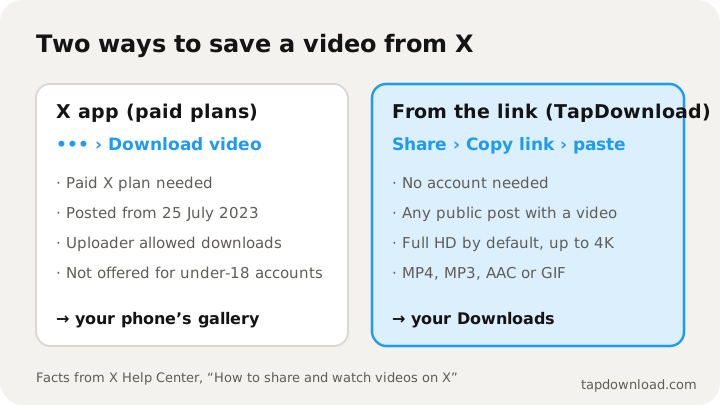
The rest of this guide covers both, step by step, then how to pick a size, how to keep just the sound, where the file ends up, and why some videos can't be saved at all.
How do I download a video in the X app with Premium?
X's help page says that X Premium subscribers, and subscribers to its other paid plans, "can download videos from certain posts for offline viewing". The steps it gives:
- Go to the video you'd like to download.
- Tap the three-dot icon in the top right corner.
- Tap Download video.
If you don't see Download video, one of these applies, all from X's help page:
- The uploader switched it off. When posting a video, people can turn off Allow video to be downloaded. X notes this can't be changed later; the only way to stop downloads afterwards is to delete the post.
- The video is older. X says videos posted before 25 July 2023 are not downloadable through this option.
- The uploader is under 18. For accounts under 18, X sets video downloads to off and they can't be turned on.
- You're not on a paid plan. Without a subscription, the option isn't offered.
Videos in Direct Messages work a little differently: X says that from app version 10.24, you can press and hold a video in a DM and tap Download video, unless the sender turned it off.
How do I download Twitter videos without Premium?
This works for any public post with a video, on a phone or a computer, without an X account. It's how to download Twitter videos for free and how to save videos from X without Premium, on Android, iPhone and computers alike.
- Copy the post's link. In the X app, tap the Share icon under the post, then Copy link. On a computer, open the post and copy the address from the browser bar. Links from x.com, twitter.com and mobile.twitter.com all work.
- Paste it into TapDownload. Open the X (Twitter) video downloader and paste the link. The search starts by itself.
- Tap Save. The MP4 goes to your Downloads, in Full HD when X has it.
A post can hold up to four videos or photos. TapDownload lists each one, so you can save them separately or tap Download several to get them all in one ZIP.
Which size should I download: Full HD, 4K or smaller?
X keeps several copies of every video, from small to sharp. (GIF posts are videos too; see how to download GIFs from X, and for pictures how to save X images in full size.) TapDownload lists the real ones with their sizes, read from the files themselves, so you can choose:
| Label | What it means | Pick it for |
|---|---|---|
| Full HD (the default) | Up to 1920 pixels on the long side | Almost everything: sharp, and plays everywhere |
| 4K, big file | 3000 pixels or more on the long side, when X kept one | Big screens and editing; files can be tens of MB |
| HD | About 1280 pixels on the long side | Sending over a slow connection |
| Smaller file | The low-resolution copies | Saving data on your phone plan |
Full HD is the default on purpose: a 4K copy can be ten times the size, which is a lot on a phone. 4K is one tap away in the save options when X has it. X's help page lists 1080p as its upload size for most videos, so many posts top out at Full HD, and TapDownload never makes a copy bigger than X's own.
Can I download a Twitter video as MP3?
To save just the audio of an X video, paste the post's link, tap the sliders button and pick MP3. Your browser turns the video's sound into a 192 kbps .mp3 file in a few seconds, and nothing is uploaded anywhere. If you want the sound exactly as X stored it, pick AAC instead: it's copied out of the video without re-encoding.
That makes TapDownload a Twitter video downloader for MP3 as well. That's handy for a clip of a speech, a podcast snippet or a song someone posted. The file is the video's whole soundtrack, so if someone talks over the music, the talking is in it too.
How do I download Twitter videos on PC or Mac?
- Open the post on x.com in your browser. Public posts open without logging in; X may ask you to log in after a few pages, but the address of a post you opened is all you need.
- Copy the address from the bar at the top. It looks like x.com/name/status/ followed by a long number.
- Paste it into TapDownload and tap Save, or open the save options for another size.
The MP4 goes to your Downloads folder and plays in Windows Media Player, QuickTime, VLC or any browser. X's MP4s use the H.264 codec, so every editor and every upload form accepts them without converting.
How do I save a video from a reply, a quote or a thread?
A video always lives in one post: the post it was uploaded with. That matters when the video reaches you some other way:
- A quote post: if someone quotes a post that has a video, open the quoted post (tap it) and copy its link. The quote itself usually holds only text.
- A reply: a video in a reply is in that reply, so copy the reply's link with Share, Copy link.
- A thread: each post in a thread has its own link. Copy the one with the video you want.
- A repost: a repost points at the original. Its link works, or open the original and copy that.
If TapDownload says a post has no video, you've most likely copied the quote or the reply rather than the post with the video.
Can I save a video from an X Direct Message?
Direct Messages are private, so no website can open them, TapDownload included. Inside the app, X's help page says that from app version 10.24 you can press and hold a video in a DM and tap Download video, unless the sender turned off Allow video to be downloaded when sending it. If the option isn't there, ask the sender to share the video another way.
How do I trim or edit a downloaded X video?
Once it's saved, an X video is a normal MP4. On iPhone, open it in Photos and tap Edit to trim the ends. On Android, Google Photos has the same trim tool. On a computer, QuickTime (Mac) and the Photos app (Windows) both trim, and CapCut, iMovie, Premiere Pro and DaVinci Resolve open the file directly. If you publish anything made from someone else's video, credit them.
Where does the video go on Android, iPhone and PC?
- iPhone and iPad: Safari saves it to the Files app, in Downloads. Open it there, tap Share, then Save Video to add it to Photos. Every step is in how to save Twitter videos on iPhone.
- Android: Chrome saves it to Downloads, and your gallery app shows it.
- Windows and Mac: your Downloads folder. It plays in any video player.
Downloads made in the X app go to your phone's gallery instead.
Why won't an X video download?
- The account is protected. Protected posts are only visible to approved followers, so they're not on the public web and no website can open them.
- X hides the post from logged-out visitors. Some posts marked as sensitive or age-restricted aren't shown without logging in. TapDownload says so when that happens.
- It's a live broadcast. X shares lives and their replays inside its own player, not as a file, so there's nothing to save. TapDownload tells you when a link is a live.
- The post was deleted. Once it's gone from X, the video is gone too.
- It's a video from another site. A YouTube link inside a post plays from YouTube, not X. Save it from where it lives.
- It's an X Space. Spaces are live audio rooms, not video posts.
Is it OK to download videos from X?
A video on X belongs to whoever made it. Saving one to watch later, to keep a copy of your own post or to show someone is ordinary personal use. Reposting someone else's video as if it were yours isn't. A few habits keep it fair:
- Save your own, or ask first. If you want to repost a video, ask the person who posted it.
- Credit the creator when you share it, with their @username.
- Respect "downloads off". When an uploader turns off Allow video to be downloaded, X explains that people can still share a link to the post. If you want a copy anyway, ask them.
TapDownload isn't affiliated with X Corp. It only reads what X shows to anyone who opens the public link; how TapDownload works explains the rest, and every other guide is in the guides list.