How to Download Your Instagram Data
TapDownload is a free website that saves public Snapchat, TikTok and X videos and photos from their link. It is not affiliated with Snap Inc., TikTok or X Corp.
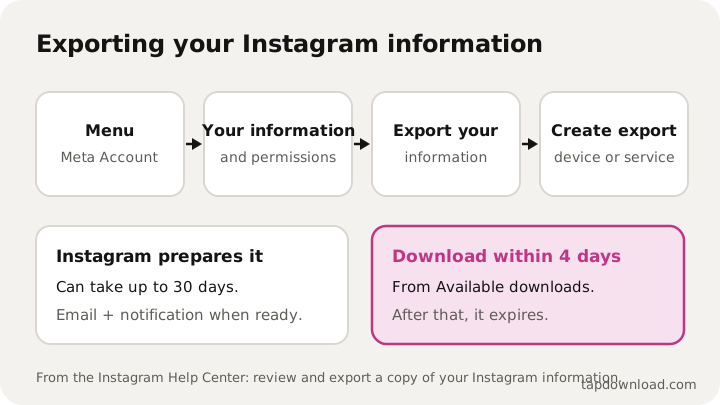
To download your Instagram data, go to your profile, tap Menu, then Meta Account (or Accounts Center), Your information and permissions, Export your information, and Create export. Pick your profile, choose Export to device, select what to include, the date range, format and media quality, then tap Start export. Instagram can take up to 30 days, and you then have 4 days to download it.
What is Instagram's Download Your Information?
It's Instagram's own tool for getting a copy of everything in your account: your posts, reels, stories, messages, profile details, followers and more. Instagram now calls it Export your information, and it lives in Meta Account settings (some people still see Accounts Center; Instagram says it's moving everyone over gradually).
It's the only official way to get all your photos and videos at once, in the quality you shared them, without a watermark. People use it to back up before deleting an account, to move to a new phone, or just to keep years of posts safe. Below is how to download Instagram data step by step, on a phone or a computer, and what you get.
How do I download my Instagram data on my phone?
- Go to your profile and tap Menu at the top right.
- Tap Meta Account (or Accounts Center), then Your information and permissions.
- Tap Export your information, then Create export.
- Pick the Instagram profile to export and tap Next.
- Choose Export to device.
- Choose what to include, the date range, the format, the email for the notice and the media quality.
- Tap Start export.
Instagram says the export is password-protected and only you can open it. When it's ready you get an email and an Instagram notification. Go back to Export your information and look under Available downloads.
How do I download my Instagram data on a PC?
The same tool is on instagram.com in a browser, and Instagram's help page has Computer Help steps for it. Open your settings, find Your information and permissions in Meta Account or Accounts Center, and follow the same Create export steps. Downloading on a computer is often easier for a big export: it's one large file, and a computer has more room for it than most phones.
Can I send my Instagram data to Google Drive or Dropbox?
Yes. In step 5, choose Export to external service instead of Export to device. Instagram then asks you to:
- Pick the service and connect to it.
- Choose how often to export, once or on a schedule.
- Enter your Instagram password.
- Customise the export, then tap Start export.
Instagram's help page lists different information types for the two routes, and notes that exporting to an external service can include a copy of the original media you shared, like photos and videos. This route also saves your phone from a huge download.
Should I export to my device or to a cloud service?
| Export to device | Export to external service | |
|---|---|---|
| Where it goes | A file you download | Straight into the service you connect |
| Space needed | Room on your phone or computer | Room in that service |
| How often | Once, each time you ask | Once, or on a schedule you choose |
| Best for | A full backup you hold yourself | Big media libraries, regular backups |
Both are started from the same Export your information screen, and both are password-protected. If you're not sure, a device export is the simplest: one file, yours to keep.
What's in my Instagram data?
For an export to your device, Instagram lists these types of information:
| Type | What Instagram says it covers |
|---|---|
| Your Instagram activity | Information and activity from different parts of Instagram |
| Personal information | What you gave when you set up your profile |
| Connections | Who you're connected to, and how |
| Logged information | What Meta logs about your activity, like location and search history |
| Security and login information | Technical and login activity for your profile |
| Apps and websites off of Instagram | Apps you own and activity from sites and apps outside Instagram |
| Preferences | How you've customised Instagram |
| Ad information | Your interactions with ads and advertisers |
You can take all of it or only some. Instagram offers two choices: Available information, which is your information and activity without data logs, or Specific types of information, which adds data logs and lets you pick only certain types, like just photos or just messages.
How do I download only my photos and videos?
Choose Specific types of information and tick only the media you want. A smaller selection gives a smaller file that's ready sooner. Set the media quality to high if you want the best copies; Instagram notes that high-quality video makes the files larger. That's the clean copy of your reels too, with no watermark; the guide to downloading Instagram reels compares it with the Download button.
How long does it take to download Instagram data?
Instagram says it may take up to 30 days to email you the link. A smaller selection is less to prepare, so export only what you need if you're in a hurry. Once it's ready, you have 4 days to download it from Available downloads. After that it expires and you'd have to start a new export. You can also delete an export or see past requests in the Past request section.
How big is my Instagram data file?
That depends on how much you've posted and what you choose. Instagram's advice is to check your free space first: high-quality video makes the files larger, and picking only one type of information makes them smaller. If your phone is nearly full, export to a computer or to an external service instead.
Can I download Instagram data to see who unfollowed me?
Not directly. Instagram describes the export's Connections part as who and how you've connected with people on Instagram, and it's a snapshot of the day you export. Instagram doesn't give you a list of who unfollowed you. If you export twice, some weeks apart, and compare the follower lists, a name missing from the newer one has unfollowed you, or deactivated or renamed their account, in between.
What if my Instagram data never arrives?
- Give it time. Instagram says it can take up to 30 days.
- Check the email address you chose when you created the export, including the spam folder.
- Look in the app. Export your information shows Available downloads and Past requests, so you can see if it's ready or still being prepared.
- Check the 4 days. If it was ready and you missed the window, it has expired: create a new export.
- Make it smaller. A shorter date range or only one type of information is less to prepare.
Can I download data from a deactivated or disabled account?
Instagram's help center gives two reasons an export may not be possible:
- Deactivated: you deactivated the profile. Reactivate it, then export.
- Scheduled for deletion: you asked to delete it. Cancel the deletion, then export.
If you can't get into your profile at all and still want your information, Instagram says you can contact it from the help center page.
How do I download Instagram data before deleting my account?
- Export your information with high media quality, and wait for it.
- Download it within the 4 days and check that it opens.
- Copy it somewhere safe, such as a computer or cloud storage.
- Then delete. Once an account is deleted, there's nothing left to export.
Remember what isn't included: Instagram says the export won't contain things someone else shared, such as another person's photos you're tagged in. If those matter, ask the people who posted them. And some information you deleted may be kept temporarily for safety, but won't appear in your download.
How do I open the downloaded file?
The export downloads as a compressed file, which is why so many people search for the "Instagram data ZIP". On an iPhone, tap it in the Files app to unzip it. On Android, open it with the Files app. On a computer, double-click it. The format you picked when you created the export decides how the files inside are laid out. Keep the original download as your backup and work from an unzipped copy.
Is it safe to download my Instagram data?
The export is password-protected and only you can request it. The file itself, though, holds a lot: your messages, your search history, where you've logged in from. Treat it like a passport scan. Keep it on your own devices, don't upload it to random websites, and be careful with any app that asks for it.
TapDownload isn't affiliated with Instagram or Meta, and it never asks for your Instagram file or password. Snapchat has a similar export for Memories, explained in how to download all your Snapchat Memories. More guides are in the guides list, and about TapDownload explains how they're checked.