How to Save Instagram Photos and Posts
TapDownload is a free website that saves public Snapchat, TikTok and X videos and photos from their link. It is not affiliated with Snap Inc., TikTok or X Corp.
To keep every photo you post, turn on Save original photos: Profile, Menu, Archiving and downloading, then the Save original photos toggle. To save someone else's post, tap Save under it. It goes to a private Saved list on your profile, not your camera roll. To get all your own photos at once, export your Instagram information.
How do I save photos from Instagram?
It depends on whose photos they are. Instagram treats your own photos and other people's very differently:
| You want | Instagram's way | Lands in |
|---|---|---|
| Every photo you post, as you post it | Save original photos (setting) | Your phone's photo library |
| All your past photos at once | Export your information | Files you download |
| Someone else's post, to come back to | Save (bookmark), collections | Your private Saved list, inside Instagram |
| A photo from your story | Options › Save | Your phone's photo library |
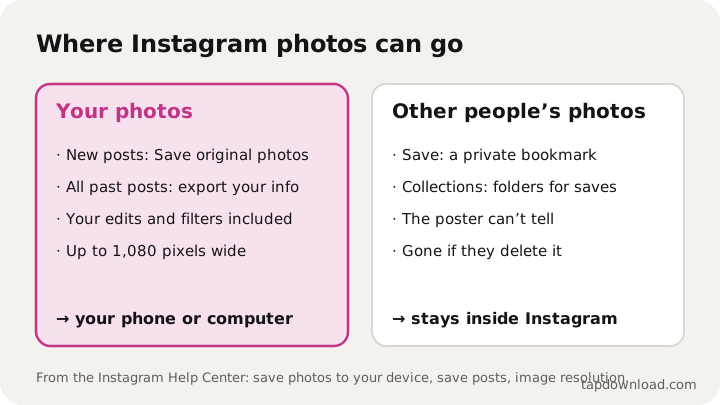
Instagram doesn't offer a way to download another person's photo to your phone. TapDownload doesn't save Instagram photos from a link either, because logged-out Instagram pages don't show them. Everything below uses Instagram's own features.
How do I save the photos I post to my camera roll?
- Tap your profile picture at the bottom right to go to your profile.
- Tap Menu at the top right.
- Below Your app and media, tap Archiving and downloading.
- Turn on the toggle next to Save original photos.
Instagram's help center says that with Save original photos (or Save original posts) on, every photo you post is also saved to your phone's library, with the filters and edits you made in Instagram. It works from the moment you turn it on; it doesn't go back and save older posts. For those, see the export further down. On Android, Instagram notes the photos can take a little while to appear in the phone's Instagram album.
Can I save someone else's Instagram photo?
To your Instagram, yes; to your phone, Instagram doesn't offer it. Tap Save (the bookmark icon) under any post in your feed or on a profile. Instagram says:
- Saved posts go to a private section of your profile that only you can see.
- The person who posted it can't tell that you saved it.
A saved post stays as long as the original does. If the poster deletes it, archives it or makes their account private, it can disappear from your list. If you need a real copy, for example a photo of you a friend posted, ask them to send it. Photos you're tagged in also don't come with your own data export: Instagram says the export won't include information someone else shared, like another person's photos you're tagged in.
Where do I find saved collections on Instagram?
Go to your profile, tap Menu at the top right, then Saved below How you use Instagram. On a computer, instagram.com has the same Saved list on your profile. Everything you've bookmarked is there, newest first, along with any collections you made.
How do I sort saved posts into collections?
Collections are folders for your saved posts. Two ways to make one:
- From a post: tap and hold Save under it, then pick a collection or tap New collection.
- From your Saved list: Profile, Menu, Saved, then New collection at the top right. Name it, tap Next, choose saved posts to add, then tap Save.
Instagram also lets you make a collaborative collection with other accounts, so friends can add to the same folder, which is good for trip ideas or recipes. Saved reels work the same way; the guide to downloading Instagram reels explains how Save differs from Download.
How do I download all my Instagram photos at once?
Use Instagram's export tool. In short: Profile, Menu, Meta Account (or Accounts Center), Your information and permissions, Export your information, Create export. Choose your profile, then Export to device, and pick the information, date range, format and media quality. Instagram says an export to an external service can include a copy of the original media you shared.
It isn't instant: Instagram says it can take up to 30 days to send the link, and once it's ready you have 4 days to download it. The full walkthrough, including what to do if your account is deactivated, is in how to download your Instagram data.
Why do my saved Instagram photos look smaller?
Because Instagram resizes photos when you post them. From its help page on image resolution:
- Photos are stored at up to 1,080 pixels wide. A bigger photo is sized down to 1,080.
- A photo narrower than 320 pixels is enlarged to 320 pixels wide.
- Between 320 and 1,080 pixels wide, it keeps its resolution if the shape is between 1.91:1 (wide) and 3:4 (tall), meaning 1,080 pixels wide and between 566 and 1,440 pixels high.
- Other shapes are cropped to fit.
So the copy that comes back out of Instagram is at most 1,080 pixels wide, even if your camera shot 4,000. That's plenty for a phone screen, but not for a large print. Keep the original in your camera roll if you might print it, and for the sharpest posts, upload photos at least 1,080 pixels wide in a supported shape.
Can I save an Instagram photo without a screenshot?
For your own photos, yes: Save original photos or the export give you the real file, not a screenshot. For other people's, Instagram's answer is the Save bookmark. A screenshot also captures the screen around the photo, at your screen's resolution, so it's a lower-quality copy than the original either way. Instagram's help pages don't describe notifying anyone about screenshots of a post.
How do I save a post with several photos?
Tap Save once and the whole post, every photo in it, goes to your Saved list together. For your own multi-photo posts, Save original photos saves each photo to your library when you post. For older ones, the export includes each photo as its own file.
How do I save Instagram photos on a PC or Mac?
On instagram.com you can bookmark posts with Save and see your Saved list, just like in the app. Save original photos is an app setting, because it saves to your phone. To get your own photos onto a computer, run the export in a browser (Instagram's help center has Computer Help steps for it, under Your information and permissions) and download the files there, or copy the photos from your phone after Save original photos has saved them.
What if my photos aren't saving?
- Check the setting. Profile, Menu, Archiving and downloading: Save original photos should be on.
- Check permissions. On iPhone: Settings, Apps, Instagram, Photos, set to Full Access or Add Photos Only. On Android, allow Instagram to access photos and media.
- Check storage. A full phone can't save new files.
- Wait a moment on Android. Instagram mentions a delay before photos show in the Instagram album.
- Update the app from the App Store or Google Play.
Why are my saved collections not showing?
A saved post depends on the original, so most gaps have a plain cause:
- The post is gone. If the poster deleted or archived it, it can't show in your Saved list.
- The account went private. If you don't follow a private account, its posts aren't shown to you, saved or not.
- You're in another account. Saved lists belong to one Instagram profile. If you switch between accounts, check you're on the one you saved from.
- The app needs updating, or your connection dropped while the list was loading. Update Instagram, then close and reopen it.
If a post seems missing from a collection, look through everything in Saved: it may be saved but not filed in that collection. And remember that Saved was never a backup. For photos you can't afford to lose, keep a real copy: your own with Save original photos or the export, other people's by asking them.
Does saving work the same on iPhone and Android?
Mostly, yes. The menus in this guide are Instagram's steps for the iPhone app, and the Android app uses the same names: Menu, Archiving and downloading, Saved. Two differences show up. Photos land in the iPhone's Photos app, or in Gallery or Google Photos on Android. And Instagram notes Android can take a moment before saved photos appear in the phone's Instagram album. On an iPad, you reach Saved by tapping your profile picture on the left, then Menu.
Using other people's photos fairly
A photo on Instagram belongs to the person who took it. Bookmarking it is exactly what Save is for. Reposting it, editing it or using it for a business is a different thing: ask first, and credit them. Instagram's Share button, which links back to the original post, is the safest way to pass a photo on.
TapDownload isn't affiliated with Instagram or Meta. For public photos on other platforms it does save from a link: see how to download TikTok photos and how to save X images in full size. About TapDownload explains how the guides are checked, and all guides are in one list.
Sources
- Instagram Help Center: Save Instagram photos to your device
- Instagram Help Center: Save posts you see on Instagram
- Instagram Help Center: Create a collection for posts you save on Instagram
- Instagram Help Center: Image resolution of photos you share on Instagram
- Instagram Help Center: Review and export a copy of your Instagram information