How to Download Instagram Reels to Your Camera Roll
TapDownload is a free website that saves public Snapchat, TikTok and X videos and photos from their link. It is not affiliated with Snap Inc., TikTok or X Corp.
To download an Instagram reel, open it in the Instagram app, tap Share and then Download. It saves to your camera roll with an Instagram watermark and the creator's username. This works for your own reels and for public reels whose creator allows downloads. To keep a reel without the watermark, save the draft to your camera roll before you post it.
What are the ways to download an Instagram reel?
Instagram gives you three official ways to get a reel onto your phone, and which one fits depends on whose reel it is and whether it's posted yet.
| Way | Whose reels | Watermark | Music |
|---|---|---|---|
| Share, then Download | Yours, and public reels that allow downloads | Yes: Instagram logo, username, audio credit | Original audio can come along |
| Save draft to camera roll | Only yours, before you post | No | Music from Instagram's library isn't saved |
| Export your information | Only yours, everything at once | No (your original media) | As you shared it |
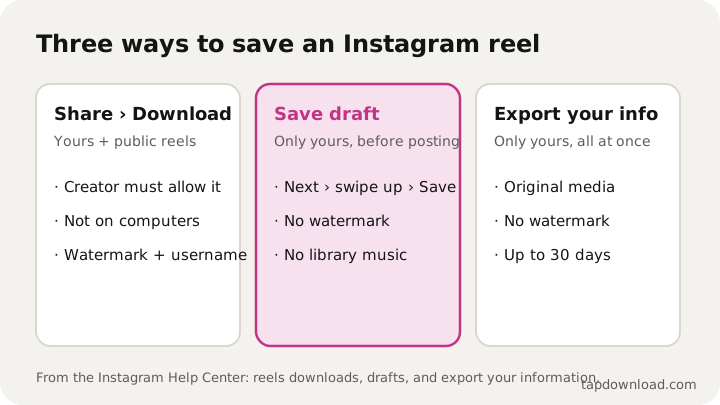
The tapping that most people search for is the first one. The other two matter when the watermark or the music is the problem. TapDownload doesn't save Instagram reels from a link: logged-out Instagram pages don't show the video, so this guide sticks to the ways Instagram itself offers.
How do I download a reel in the Instagram app?
- Open the reel in the Instagram app on your phone or iPad.
- Tap Share (Instagram calls it Sharing options) at the bottom right of the reel.
- Tap Download. The reel goes to your camera roll: Photos on an iPhone, Gallery or Google Photos on Android.
Instagram's help center says downloaded reels include an Instagram watermark, the account's username and the audio attribution. That's on purpose: the copy carries its credit wherever it goes. It also says downloading isn't offered on computers, so instagram.com in a desktop browser has no Download button for reels.
How do I save Instagram reels to my camera roll?
To download your own Instagram reels after posting, it's the same as above: open it from your profile's Reels tab, tap Share, then Download. You get the watermarked version.
To save reels to your camera roll without posting them, and without a watermark, save the draft first. Instagram's steps for a reel you're making:
- Record or pick your clips and tap Next.
- Swipe up to edit.
- Swipe from left to right, then tap Save at the bottom.
That copy has no watermark because nothing has been posted yet. One catch, in Instagram's own words: downloading your reel won't save any music you added from the Instagram music library. If the soundtrack matters, keep the original sound on your phone and add it back in another editor, or accept the watermarked download after posting.
Can I download reels from Instagram drafts?
Yes, with the camera-roll steps above. It helps to know where drafts live. Instagram says drafts are saved on your device, not in your account: you can't open a draft from another phone even if you log in there, and if you uninstall the app, your drafts are gone. There's no limit to how many drafts you can keep.
To open a draft later, go to your profile, tap Reels below your profile info, then Drafts. If you're about to reinstall Instagram or switch phones, save each draft you care about to the camera roll first. Saved there, it's an ordinary video file and survives anything that happens to the app.
Can I save someone else's reel?
Sometimes. Instagram's rules, from its help page on who can download reels:
- Public accounts: anyone on Instagram can download their reels, unless the creator turned downloads off.
- Private accounts: no one can download their reels.
- Under 18: for public accounts of people under 18, downloads start turned off, though they can turn them on.
When downloads are allowed, the steps are the same: Share, then Download. The copy carries the creator's username, so the credit travels with it. Instagram adds that downloaded reels may not be used for commercial purposes. If you want to feature someone's reel on a business account or in an ad, ask them.
Why is there no Download button on a reel?
Work down this list:
- The account is private. Reels from private accounts can't be downloaded by anyone else.
- The creator turned downloads off, for all their reels or just this one.
- The creator is under 18 and hasn't turned downloads on.
- You're on a computer. Downloading reels is only in the Android, iPhone and iPad apps.
- The reel is older than the feature. Instagram's help page says only new reels created after downloading became available can be downloaded, unless the creator changes their download settings.
- Your app is out of date. Update Instagram from the App Store or Google Play and look again.
If none of these explain it, use Save instead. It doesn't put the video on your phone, but it keeps the reel in a private list you can come back to (more on that below).
Can I download my own Instagram reels without the watermark?
Only your own. Every reel downloaded through Share › Download carries the watermark; Instagram doesn't offer a clean version of someone else's reel. For your own reels you have two clean routes:
- Before posting: save the draft to your camera roll, as shown above. No watermark, but no library music either.
- After posting: export your Instagram information. Instagram says an export to an external service can include a copy of the original media you shared, and an export to your device lets you pick the media quality. That's the clean, full-quality copy of everything you posted. See how to download your Instagram data.
The original clips you filmed with your phone's camera were never watermarked, so if you still have them, that's the best copy of all.
Why does a downloaded reel have no sound?
Music from Instagram's library is licensed for use inside Instagram, so it doesn't always follow the video out. Instagram says two things here. A draft saved to your camera roll doesn't keep music you added from the library. And original audio (sound recorded for a reel, rather than a licensed track) can be included in a downloaded reel if the reel it first came from is downloadable.
So can you save Instagram reels with music? A reel with a voiceover or its own sound usually downloads with sound, and a reel built on a chart song may not. To come back to a song you like, Save the reel: it stays in your private Saved list inside Instagram.
How do I stop people downloading my reels?
Instagram gives you three switches, all in the app:
- When you share a reel: after editing, tap Next, then More options, and set Allow people to download your reels on or off. You can apply it to all your reels or just the one you're posting.
- For every reel: go to your profile, tap Menu, then Sharing and reuse, and set Downloads on or off.
- For one posted reel: open it from your profile, tap Options, then Manage, then Turn off downloading.
Two limits from the help center are worth knowing. Copies people already downloaded stay on their phones when you change the setting. And making your account private stops all downloads by other people. Instagram is also plain about what it can't do: it can't control what people do with reels after they download them.
What's the difference between Save and Download?
Save is a bookmark. Tap Save under a post, or Options then Save on a reel, and it's added to a private list on your profile. Only you can see it, and the creator can't tell you saved it. Nothing goes to your phone's gallery, and if the creator deletes the reel, it's gone from your list too.
Download makes a video file in your camera roll. It stays there even if the reel is deleted, and you can send it anywhere.
To find saved reels: go to your profile, tap Menu, then Saved under How you use Instagram. You can sort them into collections by tapping and holding Save on a post. The guide to saving Instagram photos and posts covers collections in full.
Where do downloaded reels go?
- iPhone and iPad: the Photos app, under Recents. Instagram asks for permission to add to Photos the first time.
- Android: your Gallery or Google Photos, usually in a folder named Instagram, or in Movies or Pictures depending on the phone.
If a download seems to vanish, check that Instagram has permission to save to your photos (iPhone: Settings, Apps, Instagram, Photos). Android phones can show a short delay before a new file appears in the gallery.
Can I save an Instagram live video?
Only your own, and only right after it ends. Instagram says that when you end a live broadcast you can tap Download Video to save it to your camera roll. Only the video is saved, not comments, likes or the viewer list, and only you see that option. A long live can take a minute to save. Instagram also lists a Live archive under Your activity, then Archived.
Is it OK to download and repost reels?
Downloading a public reel the creator allows is something Instagram built for sharing: the watermark and username are there so the credit goes with it. Reposting it as your own, or using it to sell something, is a different matter; Instagram's rule is no commercial use of downloaded reels. When in doubt, share the reel's link or use Instagram's own Share to story, which links back to the creator.
TapDownload isn't affiliated with Instagram or Meta. For TikTok, X and Snapchat, it does save public posts from a link: see how to download TikTok videos and how to download videos from X. Every guide is in the guides list, and about TapDownload explains how the guides are checked.
Sources
- Instagram Help Center: Who can download your Instagram reels
- Instagram Help Center: Manage reels on Instagram
- Instagram Help Center: Save and edit drafts of your reel on Instagram
- Instagram Help Center: Save posts you see on Instagram
- Instagram Help Center: Save a live video on Instagram to your device's camera roll