How to Save Instagram Stories to Your Camera Roll
TapDownload is a free website that saves public Snapchat, TikTok and X videos and photos from their link. It is not affiliated with Snap Inc., TikTok or X Corp.
To save your Instagram story, open it, tap Options (the three dots) at the bottom right, tap Save, then Save Photo/Video for one part or Save Story for all of it as a single video. Before sharing, tap Save at the top of the screen. After 24 hours, open your Stories Archive and save from there.
When can I save an Instagram story?
At three moments, and Instagram has a button for each:
| When | Where to tap | What you get |
|---|---|---|
| Before you share it | Save, at the top of the editing screen | That photo or video, with your text and stickers |
| While it's live (24 hours) | Options › Save | One part, or the whole story as one video |
| After 24 hours | Archive › Options › Save | One part at a time, from your Stories Archive |
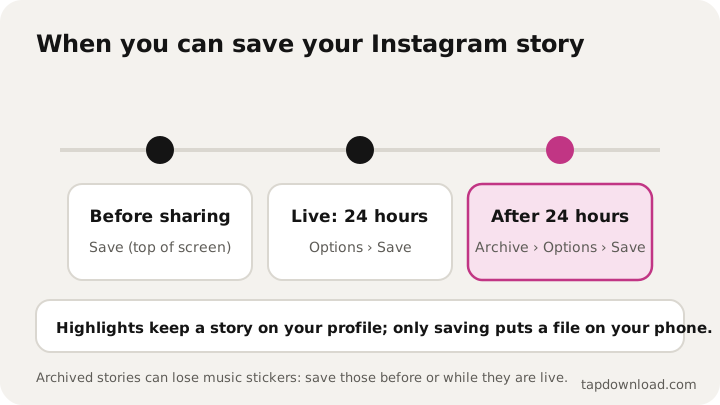
All three are for your own stories. Instagram doesn't have a button to save someone else's story; more on that further down. TapDownload doesn't save Instagram stories from a link either, because logged-out Instagram pages don't show them.
How do I save a story before posting it?
On the editing screen, after you've taken the photo or picked the video and added any text or stickers, tap Save at the top of the screen. Instagram's help center says this saves it to your phone before you share it.
This is the best moment to save, for two reasons. You keep your edits, and nothing has been through Instagram's archive yet, so stickers and music are as you made them. It also works for a story you decide not to post at all.
How do I save a story I've already posted?
- Open your story. Tap your profile picture at the top of your feed, or on your profile.
- Tap Options (the three dots) at the bottom right of the photo or video you want to save.
- Tap Save…
- Tap Save Photo/Video for that one part, or Save Story to save everything in your story as a single video.
Save Story is handy when your story has many parts: you get one video that plays them all in order, which is easy to send or keep. Save Photo/Video keeps each part as its own file, so photos stay photos.
How do I save an Instagram story after 24 hours?
From your Stories Archive. Instagram says stories you share are saved there automatically once they disappear, unless you turned the archive off. To save one:
- Go to your profile and tap Menu in the top right.
- Tap Archive. (Or: Menu, Your activity, Archived, then Stories archive at the top.)
- Open the story you want and tap Options at the bottom right.
- Tap Save photo or Save video.
That's how to download Instagram stories from the archive, one part at a time. The archive goes back as far as you've had it switched on. That makes it the place to look for an old story from months ago: scroll back to the date you want.
How do I turn the Stories Archive on or off?
Go to your profile, tap Menu, then Your activity, then Archived. Tap Options in the top right, then Settings, and set Save story to archive. If it's off, a story is gone for good after 24 hours unless you saved it to your phone yourself.
Instagram adds a note on privacy: archived stories can't be seen by anyone unless you share them again. It also says archived stories you shared publicly will be used to improve AI at Meta unless you delete them or make your account private. If that matters to you, save the stories you want to keep to your phone and delete them from the archive.
You can also archive a story early. Open it, tap Options, then Archive, and it leaves your story before the 24 hours are up.
Why is the music missing from an archived story?
Instagram changes some stories when it moves them to the archive, to keep up with storage. Its help center says this can mean muting music or freezing videos or GIFs. A photo story with a music sticker, for example, still appears in your archive, but the sticker no longer plays music. These changes are permanent, and a story you reshare from the archive won't include anything that was removed.
Instagram says this doesn't affect stories that contain original videos you haven't shared to Feed or Reels. The practical lesson: if a story's music or a moving sticker matters, save it to your phone before you share it, or while it's still live.
How do I save Instagram stories to highlights?
Add them to a highlight to keep a story on your profile after 24 hours. Highlights stay on your profile until you remove them, even after the original story disappears.
- On your profile, tap New (or Story highlight) below your bio.
- Pick the stories to include and tap Next.
- Tap Edit cover, choose a cover and a name, then tap Add.
To add a story you're watching to an existing highlight, tap More at the bottom right, then Highlight. Keep in mind that the people allowed to see your story can also see your highlights. A highlight isn't a copy on your phone, though; to have the file, save it as above.
Can I save Instagram stories from other accounts?
Not with a button. Instagram's save options are only on your own stories, and the help center doesn't describe any way to download another account's story. What you can do:
- Ask them to send it. They can save it with the steps above and send you the file.
- Share it in a message with the Share button, if they allow resharing. It stays inside Instagram and disappears when their story does.
- Look for a highlight. If they added it to a highlight, it stays on their profile.
Can I save a story without the stickers or text?
Not from Instagram once you've added them. Save on the editing screen, Save Photo/Video and the archive all give you the story as it looks, with your text, stickers and drawings on top. Instagram doesn't keep a separate clean copy.
The clean version is the photo or video you started from. If you took it with your phone's camera, it's still in your camera roll as it was. If you filmed it inside Instagram's own camera, save it from the editing screen before you add anything, then add the stickers and share. That gives you both: a clean file on your phone and the decorated story on Instagram.
The same trick helps with music. A story with a music sticker can lose its sound in the archive, as explained above, so if you want the song with it, save before sharing.
A simple routine so you never lose a story
- Leave the Stories Archive on, so every story you share is kept after 24 hours.
- Save the special ones before sharing, with Save on the editing screen, so music and stickers stay as you made them.
- Add the best to highlights, so they stay on your profile.
- Export your information once in a while, so you have a copy of everything outside Instagram too.
Four habits, and a story you care about is safe on your phone, in your archive and in a backup.
How do I save all my Instagram stories at once?
Export your Instagram information. Instagram's export tool lets you choose what to include, a date range and the media quality, and your stories come as files you can keep. It's the way to back up years of stories in one go rather than one at a time from the archive. The steps, how long it takes and what's inside are in how to download your Instagram data.
Where do saved stories go on my phone?
- iPhone: the Photos app, under Recents. If nothing appears, check Settings, Apps, Instagram, Photos and allow access.
- Android: your Gallery or Google Photos, often in an Instagram folder.
Save Story creates one video, so a story of five photos arrives as a single short video, not five pictures. Use Save Photo/Video on each part if you want the photos as photos.
Why does my saved story look worse than the original?
Two common reasons. A story saved after sharing is the copy Instagram kept, which can be smaller than what your camera shot. And a story from the archive may have had music muted or moving parts frozen, as described above. For the best copy, keep the original photo or video from your camera roll, or save from the editing screen before sharing. Instagram's help center also notes that photos are shared at up to 1,080 pixels wide; the guide to saving Instagram photos explains what that means for quality.
A note on other people's stories
Stories disappear by design, and people post things there they wouldn't put on their grid. If you want to keep something a friend shared, asking them is the simple, honest route, and they can send you the file they saved.
TapDownload isn't affiliated with Instagram or Meta. It does save public stories from Snapchat by username, and public TikTok and X posts from a link: see how to save a Snapchat story or all guides. About TapDownload explains how the guides are checked.